Dynamic Watermarking for PDF Pitch Decks

Dynamic Watermarking for PDF Pitch Decks
Executive Summary / TL;DR
In today's fast-paced business environment, sharing sensitive information, such as pitch decks, is a common practice. However, traditional file-sharing methods often expose organizations to significant security risks, including data leaks and unauthorized access. Dynamic watermarking emerges as a powerful solution to mitigate these risks by adding a layer of protection to PDF pitch decks. This article explores the vulnerabilities of conventional sharing methods, industry best practices, and how dynamic watermarking can safeguard your intellectual property.
Current Security Vulnerabilities
The Risks of Traditional File Sharing
When sharing pitch decks via email or popular file-sharing platforms like Dropbox, organizations inadvertently expose themselves to various security vulnerabilities. These methods often lack robust security features, making it easy for sensitive information to be leaked or misused. Common risks include:
-
Unauthorized Access: Files shared through unsecured channels can be accessed by unintended recipients, leading to potential data breaches.
-
Lack of Control: Once a document is sent, the sender loses control over how it is used, shared, or stored by the recipient.
-
Inadequate Tracking: Traditional methods do not provide visibility into who accessed the document or when, making it challenging to monitor potential misuse.
-
Static Watermarking Limitations: While static watermarks can deter unauthorized sharing, they can be easily removed or altered, rendering them ineffective.
These vulnerabilities highlight the need for a more secure and controlled approach to sharing sensitive documents, particularly in high-stakes environments like investor presentations or client proposals.
Industry-Specific Best Practices
To protect sensitive pitch decks, professionals across various industries can adopt the following best practices:
Step 1: Assess Your Security Needs
Before sharing any sensitive documents, evaluate the level of confidentiality required. Consider the potential impact of a data breach on your organization and tailor your security measures accordingly.
Step 2: Utilize Secure File Sharing Platforms
Opt for secure file-sharing solutions that offer advanced security features. Look for platforms that provide end-to-end encryption, access controls, and activity tracking.
Step 3: Implement Dynamic Watermarking
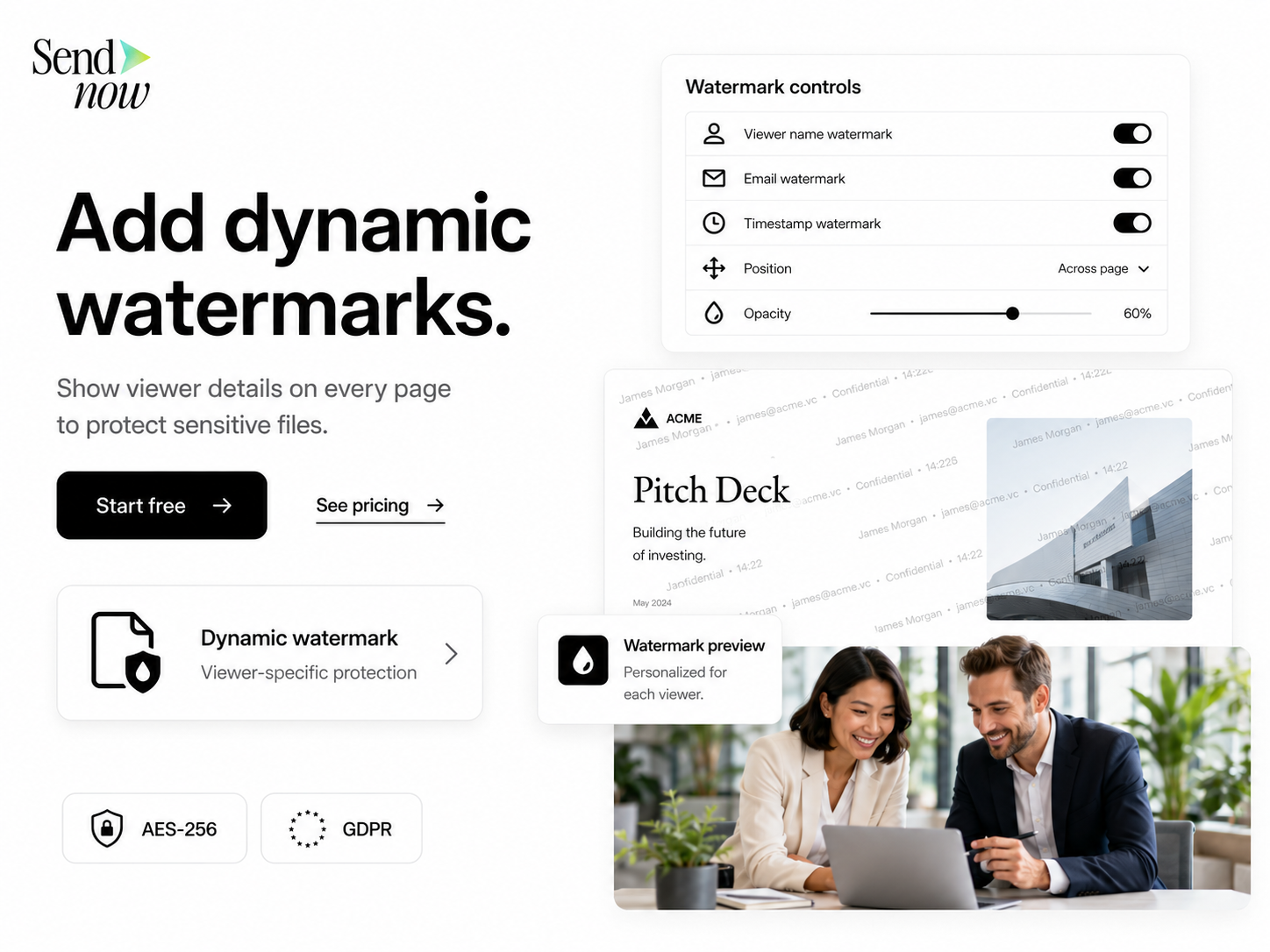
Incorporate dynamic watermarking into your pitch decks. This technology allows you to add personalized watermarks that include recipient information, such as their name or email address. This not only deters unauthorized sharing but also enables you to trace leaks back to the source.
Step 4: Set Expiration Dates
When sharing pitch decks, set expiration dates for access. This ensures that recipients can only view the document for a limited time, reducing the risk of unauthorized access after the initial sharing.
Step 5: Monitor Engagement
Use analytics tools to track how recipients interact with your pitch decks. Monitor who accessed the document, how long they viewed it, and whether they shared it with others. This data can provide valuable insights into recipient interest and potential follow-up actions.
Step 6: Educate Your Team
Ensure that your team understands the importance of document security. Provide training on best practices for sharing sensitive information and the potential risks associated with traditional methods.
SendNow Feature Deep-Dive
SendNow is a cutting-edge platform designed to address the security challenges associated with sharing sensitive documents, including pitch decks. Its unique features provide comprehensive protection against data leaks:
Dynamic Watermarking
SendNow's dynamic watermarking feature allows you to add personalized watermarks to your PDF pitch decks. Each recipient receives a unique watermark that includes their name and email address. This not only discourages unauthorized sharing but also enables you to trace any leaks back to the individual responsible.
Screenshot Blocking
One of the most significant risks when sharing digital documents is the ability for recipients to take screenshots. SendNow's screenshot blocking feature prevents users from capturing images of your pitch decks, ensuring that your sensitive information remains secure.
Email Gates
SendNow requires recipients to verify their email addresses before accessing shared documents. This adds an additional layer of security by ensuring that only authorized individuals can view your pitch decks.
Link Expiry
With SendNow, you can set expiration dates for shared links. This means that after a specified period, the link will no longer grant access to the document, further reducing the risk of unauthorized access.
NDA Gates
For particularly sensitive pitch decks, SendNow offers NDA gates that require recipients to agree to a non-disclosure agreement before accessing the document. This legal safeguard reinforces the confidentiality of your information.
For more information about SendNow and its innovative features, visit their official LinkedIn page: SendNow LinkedIn.
Technical Walkthrough
Step 1: Uploading Your Pitch Deck
- Log in to SendNow: Access your SendNow account using your credentials.
- Select 'Upload Document': Click on the 'Upload Document' button on your dashboard.
- Choose Your File: Select the PDF pitch deck you wish to share from your device.
- Confirm Upload: Once the file is uploaded, you will receive a confirmation message.
Step 2: Configuring Security Settings
- Set Dynamic Watermarking: Enable the dynamic watermarking feature and customize the watermark text to include recipient information.
- Enable Screenshot Blocking: Toggle the screenshot blocking option to prevent unauthorized captures.
- Set Email Gates: Require recipients to verify their email addresses before accessing the document.
- Configure Link Expiry: Specify an expiration date for the shared link to limit access duration.
- Add NDA Gates: If necessary, enable NDA gates to require recipients to agree to confidentiality terms.
Step 3: Distributing the Pitch Deck
- Generate Shareable Link: Once your settings are configured, generate a shareable link for your pitch deck.
- Distribute the Link: Share the link via email or other secure channels, ensuring that recipients understand the importance of confidentiality.

Step 4: Monitoring Engagement
- Access Analytics Dashboard: After sharing, navigate to the analytics dashboard to monitor engagement.
- Review Access Logs: Check who accessed the document, how long they viewed it, and any attempts to share it.
- Follow Up: Use the insights gained from the analytics to follow up with recipients and gauge their interest.
ROI & Business Impact
Investing in secure document-sharing solutions like SendNow can yield significant returns for organizations. Here are some key benefits:
Cost-Efficiency
By reducing the risk of data breaches and unauthorized access, organizations can save on potential legal fees, regulatory fines, and reputational damage. The cost of implementing secure sharing practices is often outweighed by the savings from avoiding these risks.
Contract Compliance
Many industries are subject to strict regulations regarding data protection and confidentiality. Using secure sharing methods helps organizations comply with regulations such as GDPR (General Data Protection Regulation) and e-signature laws (ESIGN Act), reducing the risk of non-compliance penalties.
Protection Value
Dynamic watermarking and other security features provided by SendNow enhance the protection of sensitive information. This not only safeguards intellectual property but also builds trust with clients and investors, ultimately leading to stronger business relationships.
Structured FAQ
Q1: How does dynamic watermarking work?
A1: Dynamic watermarking adds personalized watermarks to documents that include recipient-specific information, such as their name and email address. This deters unauthorized sharing and allows you to trace leaks back to the source.
Q2: Why is screenshot blocking important?
A2: Screenshot blocking prevents recipients from capturing images of your pitch decks, ensuring that sensitive information remains secure and reducing the risk of unauthorized distribution.
Q3: What are email gates, and how do they enhance security?
A3: Email gates require recipients to verify their email addresses before accessing shared documents. This adds an additional layer of security by ensuring that only authorized individuals can view your pitch decks.
Q4: How can I track engagement with my pitch deck?
A4: SendNow provides an analytics dashboard that allows you to monitor who accessed your document, how long they viewed it, and whether they shared it with others. This data can inform your follow-up strategies.
Q5: What should I do if I suspect a data leak?
A5: If you suspect a data leak, review the access logs in your SendNow analytics dashboard to identify the source. You can then take appropriate action, such as reaching out to the recipient or revoking access to the document.
Actionable CTA
Ready to enhance the security of your pitch decks with dynamic watermarking and other advanced features? Start your trial on SendNow today and experience the peace of mind that comes with secure document sharing. Visit SendNow Trial to get started!
About the Author: Rifana Hameem
Rifana is the founder of SendNow. She leads the team in building secure, compliant, and analytics-rich document sharing tools for finance and professional teams worldwide.
Connect on LinkedIn