How to Know If a VC Forwarded Your Pitch Deck to Competitors

How to Know If a VC Forwarded Your Pitch Deck to Competitors
Executive Summary / TL;DR
In the competitive world of startups and venture capital, protecting your intellectual property and sensitive business information is paramount. When you share your pitch deck with a venture capitalist (VC), there is always a risk that it may be forwarded to competitors, potentially undermining your business strategy and giving rivals an unfair advantage. This article explores the challenges associated with sharing pitch decks, outlines signs that your pitch may have been forwarded, and provides actionable steps to safeguard your information. By understanding the risks and implementing best practices, you can better protect your startup's future.
Current Security Vulnerabilities
The Risks of Traditional File Sharing
When you share your pitch deck via traditional methods such as email or cloud storage services like Dropbox, you expose yourself to several vulnerabilities:
-
Lack of Control: Once you send an email or share a link, you lose control over who can access your document. Recipients can easily forward your pitch deck to anyone, including competitors.
-
Insecure Links: Cloud storage services often generate links that can be accessed by anyone with the link. If the recipient shares this link, your sensitive information can be accessed by unintended parties.
-
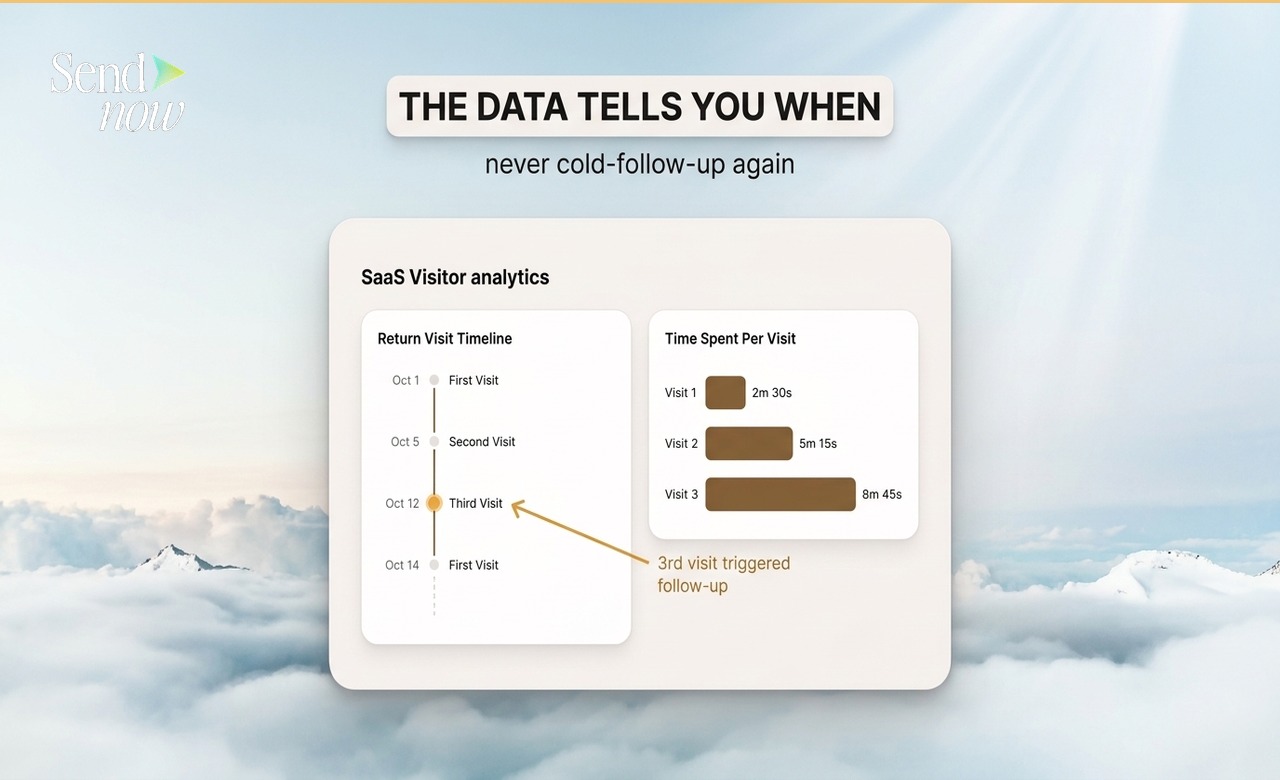
No Tracking Mechanism: Traditional file-sharing methods typically do not provide insights into who has viewed your document or how they interacted with it. This lack of visibility makes it difficult to know if your information has been shared further.
-
Email Forwarding: Emails can be easily forwarded, and there is no way to track or prevent this action. A VC might forward your pitch deck to a colleague or even a competitor without your knowledge.
-
Data Breaches: Cloud storage services are not immune to data breaches. If a service is compromised, your pitch deck could be accessed by malicious actors.
These vulnerabilities highlight the importance of using secure methods for sharing sensitive business information, especially when dealing with potential investors.
Industry-Specific Best Practices
To mitigate the risks associated with sharing your pitch deck, consider implementing the following best practices:
1. Use Secure File Sharing Platforms
Opt for secure file-sharing platforms that offer advanced security features. Look for services that provide encryption, access controls, and tracking capabilities.
2. Implement Watermarking
Add watermarks to your pitch deck that include the recipient's name or email address. This discourages unauthorized sharing, as it makes it clear who the document belongs to.
3. Set Expiration Dates
When sharing your pitch deck, set expiration dates for access. This limits how long the recipient can view your document, reducing the risk of it being shared indefinitely.
4. Use Non-Disclosure Agreements (NDAs)
Before sharing your pitch deck, consider having the VC sign a non-disclosure agreement. This legally binds them to confidentiality and provides you with recourse if your information is shared without your consent.
5. Monitor Engagement

Choose a platform that allows you to monitor engagement with your pitch deck. This includes tracking who has viewed the document, how long they spent on each page, and whether they downloaded it.
6. Limit Access
Only share your pitch deck with individuals who absolutely need to see it. Avoid sending it to multiple people within the same organization unless necessary.
7. Educate Your Team
Ensure that your team understands the importance of protecting sensitive information. Provide training on best practices for sharing documents securely.
SendNow Feature Deep-Dive
One platform that addresses these security concerns is SendNow. With its suite of features designed to protect sensitive information, SendNow offers a robust solution for sharing pitch decks securely.
Dynamic Watermarking
SendNow allows you to add dynamic watermarks to your documents. This feature displays the recipient's information on every page of the pitch deck, discouraging unauthorized sharing and making it clear who the document belongs to.
Screenshot Blocking
To further protect your information, SendNow includes a screenshot blocking feature. This prevents recipients from taking screenshots of your pitch deck, ensuring that your content remains confidential.
Email Gates
SendNow requires recipients to enter their email addresses before accessing your pitch deck. This adds an additional layer of security and allows you to track who has viewed your document.
Link Expiry
With SendNow, you can set expiration dates for links to your pitch deck. This means that even if a recipient shares the link, it will become inactive after a specified period, reducing the risk of unauthorized access.
NDA Gates
SendNow also offers NDA gates, which require recipients to agree to a non-disclosure agreement before accessing your pitch deck. This legally binds them to confidentiality, providing you with added protection.
For more information on how SendNow can help secure your pitch deck, visit their official LinkedIn page: SendNow LinkedIn.
Technical Walkthrough
Step 1: Upload Your Pitch Deck
- Log in to SendNow: Access your SendNow account.
- Upload Document: Click on the "Upload" button and select your pitch deck file from your computer.
Step 2: Configure Security Settings
- Dynamic Watermarking: Enable dynamic watermarking and customize the watermark text to include the recipient's name or email address.
- Screenshot Blocking: Activate the screenshot blocking feature to prevent unauthorized captures of your pitch deck.
- Email Gates: Require recipients to enter their email addresses to access the document.
- Set Expiration Date: Choose an expiration date for the link to your pitch deck.
- NDA Gates: If desired, enable NDA gates to require recipients to agree to a non-disclosure agreement before accessing your document.
Step 3: Distribute Securely

- Generate Link: After configuring your settings, generate a secure link to your pitch deck.
- Share with Recipients: Send the link to your intended recipients via email or direct message.
Step 4: Monitor Engagement
- Track Views: Use SendNow's tracking features to monitor who has viewed your pitch deck and how they interacted with it.
- Follow Up: Based on engagement data, follow up with recipients to gauge interest and address any questions.
ROI & Business Impact
Investing in secure file-sharing solutions like SendNow can yield significant returns for your startup:
Cost-Efficiency
By preventing leaks of sensitive information, you reduce the risk of losing competitive advantage and potential revenue. The cost of a data breach can be substantial, making secure sharing a cost-effective solution.
Contract Compliance
Using secure platforms helps ensure compliance with regulations such as GDPR and other data protection laws. This minimizes the risk of legal issues and potential fines.
Protection Value
The value of protecting your intellectual property cannot be overstated. By safeguarding your pitch deck, you maintain control over your business strategy and reduce the likelihood of competitors gaining access to your ideas.
Structured FAQ
1. How can I tell if a VC has forwarded my pitch deck?
While there is no definitive way to know if a VC has forwarded your pitch deck, signs may include a lack of engagement from the VC or unexpected questions from other parties. Using a secure platform with tracking features can provide insights into who has accessed your document.
2. Why is it important to protect my pitch deck?
Protecting your pitch deck is crucial to maintaining your competitive advantage. If your sensitive information is shared with competitors, it can undermine your business strategy and lead to lost opportunities.
3. What features should I look for in a secure file-sharing platform?
Look for features such as dynamic watermarking, screenshot blocking, email gates, link expiration, and NDA gates. These features provide enhanced security and control over your sensitive documents.
4. How can I monitor engagement with my pitch deck?
Choose a secure file-sharing platform that offers tracking capabilities. This allows you to see who has viewed your document, how long they spent on each page, and whether they downloaded it.
5. What should I do if I suspect my pitch deck has been shared without my consent?
If you suspect unauthorized sharing, review your engagement data to identify potential leaks. If you have a signed NDA, consider consulting with legal counsel to explore your options for recourse.
Actionable CTA
Protect your sensitive business information by starting a trial on SendNow today. Experience the peace of mind that comes with secure file sharing. Visit SendNow to get started.
About the Author: Rifana Hameem
Rifana is the founder of SendNow. She leads the team in building secure, compliant, and analytics-rich document sharing tools for finance and professional teams worldwide.
Connect on LinkedIn