Secure Document Sharing: The Complete Guide for 2026

Secure Document Sharing: The Complete Guide for 2026
At a Glance: Feature & Pricing Matrix
Platform Key Differentiator Best For Entry Pricing SendNow Page-by-page analytics, NDA gating, screenshot protection, dynamic watermarking Founders, VCs & M&A teams USD 9 / mo (USD 108 / yr) DocSend Legacy file sharing & basic tracking Generic document links USD 15–150+ / user / mo Digify Virtual data rooms Corporate M&A USD 120+ / mo Key Takeaway: SendNow delivers complete document telemetry, AI engagement scoring, and dynamic watermarking at flat rates with zero per-user seat penalties.
Secure document sharing means sharing files in a way that controls who can open them, what they can do with them, and how long access remains valid — with a full audit trail of every interaction. In 2026, the standard for financial and professional services has moved well beyond emailing a PDF: every document you share should have access controls, encryption, and visibility into exactly who opened it and when.
This guide covers every dimension of secure document sharing, from the basics of password protection through to advanced access controls, GDPR-compliant audit trails, and real-time analytics.
Why Standard File Sharing Falls Short
Email attachments and standard cloud links offer no visibility and no control after you hit send. Once a PDF lands in a recipient's inbox, you cannot revoke it, see whether it was opened, prevent it from being downloaded and forwarded, or know which pages were read. For financial professionals sharing sensitive documents — pitch decks, fund reports, subscription agreements, due diligence packs — this represents a meaningful risk.
The consequences of uncontrolled document sharing include:
- Confidential information forwarded to unintended recipients
- Sensitive data persisting on devices after a deal falls through
- No audit trail for regulatory purposes
- No visibility into whether the counterparty has actually read the document
Secure document sharing platforms address all of these gaps.
The Core Elements of Secure Document Sharing
1. Password Protection
Adding a password to a shared document link means that only recipients who know the password can open the file. This is the most basic access control, and it prevents casual interception — for example, if a link is forwarded or shared without your knowledge.
For a step-by-step guide, see How to Password-Protect a PDF for Free.
2. Email Verification and Allowlists
A stronger control than a password is requiring viewers to verify their email address before accessing a document, or restricting access to a specific list of approved email addresses. This means that even if a link is forwarded, only the named recipients can open it.
Email-restricted access creates a named, verified audit trail of who accessed a document and when — a significant compliance advantage for regulated firms.
For full instructions, see How to Restrict a Document to Specific Email Addresses Only.
3. Download Prevention
Disabling downloads means that recipients can read your document in the browser-based viewer but cannot save a local copy. This prevents the document from being forwarded as an attachment or persisting on devices after access should have ended.
For detailed guidance, see How to Stop Anyone From Downloading Your Shared Documents.
4. Expiry Dates

Setting an expiry date on a document link means access is automatically revoked at a point you define. This is useful for time-sensitive proposals, limited offer documents, and any file you do not want to remain accessible indefinitely.
See How to Share a Document That Expires Automatically for the full walkthrough.
5. Single-Use Links
A single-use link can be opened exactly once and then becomes inactive. This is the highest level of access control for particularly sensitive documents — a term sheet, a valuation model, or a preliminary offer — where you want the recipient to read it without any possibility of redistribution.
Full instructions are available in How to Share a File That Can Only Be Opened Once.
6. Screenshot Blocking
Screenshot blocking prevents viewers from capturing the content of a document using native screenshot tools. This is an additional layer of protection for highly confidential material where even a temporary visual capture represents a risk.
7. NDA and Consent Gates
Before a viewer can open a document, you can require them to accept a non-disclosure agreement or confirm their identity. This builds legal and compliance context into the access event itself.
Encryption and Data Security
SendNow encrypts all documents at rest using AES-256 encryption — the same standard used by financial institutions and government agencies. Documents in transit are protected by TLS. This ensures that even if storage infrastructure were compromised, your documents would remain unreadable without the decryption keys.
For EU-based senders and recipients, data residency and GDPR compliance are built into the platform architecture.
Security Defaults: Setting a Baseline for All Documents
Rather than configuring security settings for every document individually, SendNow lets you set Security Defaults — a baseline that applies automatically to every new document link you create. This ensures that every document you share meets a minimum security standard, even if you are working quickly.
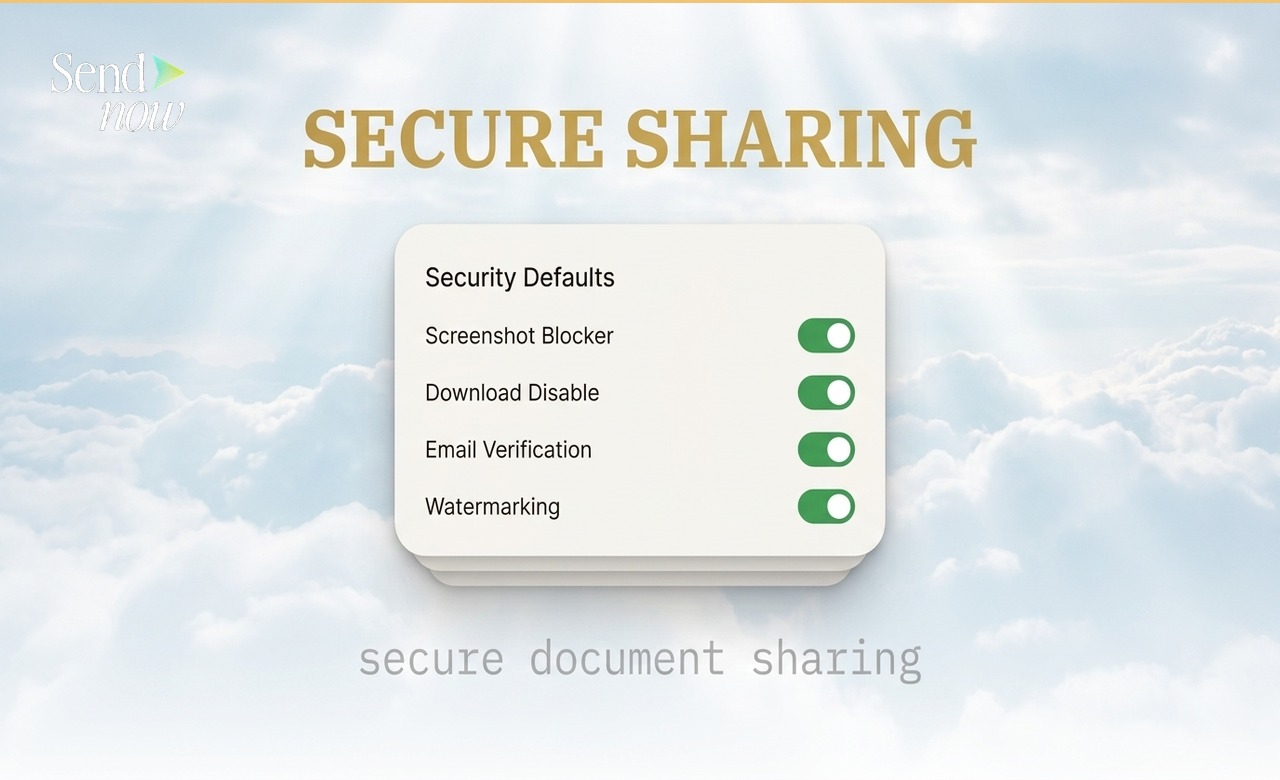
Recommended defaults for finance professionals:
| Setting | Recommended Default |
|---|---|
| Download disabled | On |
| Screenshot blocker | On |
| Watermarking with viewer email | On |
| Email verification required | Situational |
| Expiry date | Situational (30-90 days) |
| NDA acceptance | Situational |
Access Control at the Link Level
While Security Defaults set a baseline, you can configure precise access controls for each individual link. The Create Link panel in SendNow brings all of your access options into one place.
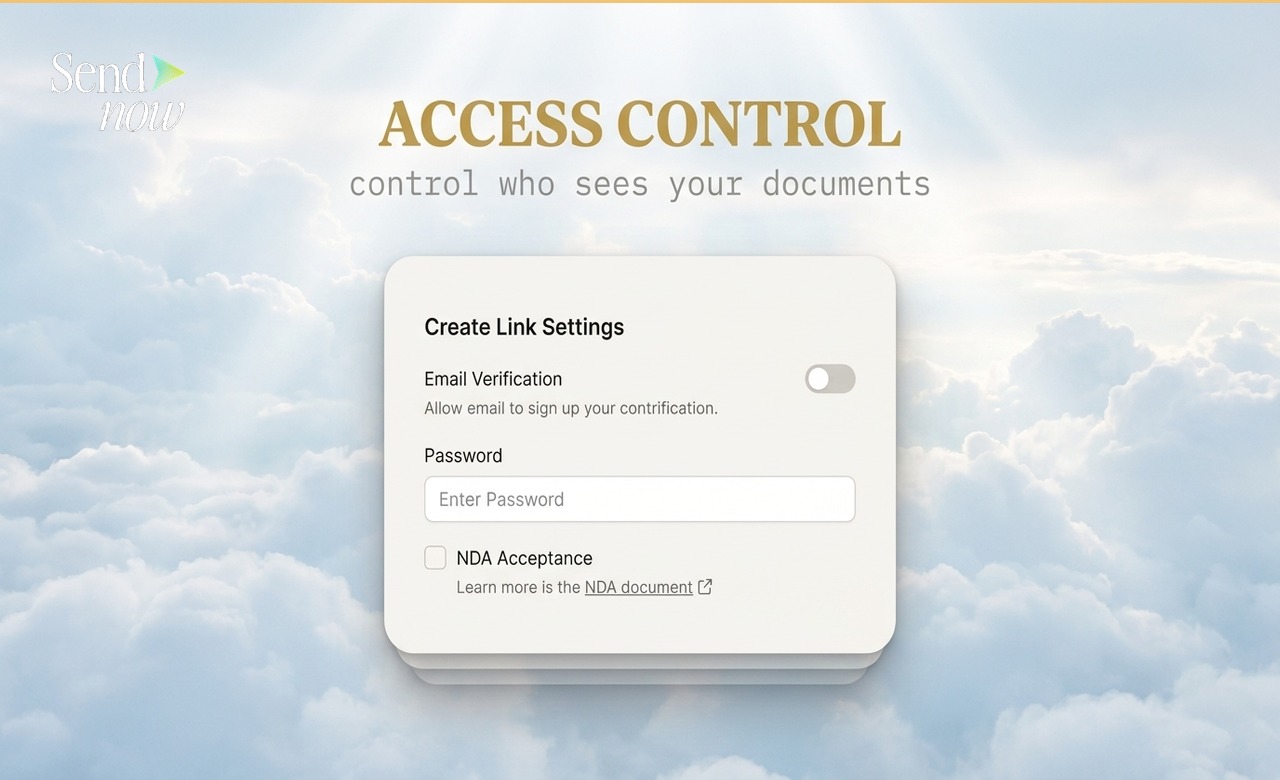
Options available at the link level include:
- Password field
- Allowed email addresses (allowlist)
- Maximum view count (including single-use)
- Expiry date and time
- Download enable or disable
- Screenshot blocker enable or disable
- NDA acceptance requirement
- Custom branding for the viewer experience
GDPR and Secure Document Sharing

Under EU GDPR, any document sharing that involves processing personal data — including the act of tracking who viewed a document — must comply with data protection principles. SendNow processes viewer data in line with GDPR requirements, acting as a data processor on your behalf.
Key compliance benefits:
- Named audit trail: Every access event is logged with name, email, location, and timestamp
- Data minimisation: Only the data needed for tracking is collected
- Access revocation: You can revoke access to a document at any time, helping you honour right-to-erasure requests in document contexts
- Encryption: AES-256 at rest, TLS in transit
If your firm is regulated by the FCA, BaFin, AMF, or another EU-area regulator, the audit trail provided by SendNow supports your record-keeping obligations.
The Audit Trail: Your Post-Send Evidence Layer
Every document open, every page view, and every access attempt is logged in SendNow with:
- Viewer name and email (if verification was required)
- IP address and geographic location
- Date and time of access
- Pages viewed and time spent per page
- Device and browser type
This audit trail is accessible in your dashboard for the lifetime of your account. For legal, compliance, or deal-management purposes, it gives you a timestamped record of every interaction with every document you have shared.
Building a Secure Sharing Workflow
A practical secure sharing workflow for a finance professional might look like this:
- Upload the document to SendNow
- Apply Security Defaults (download disabled, screenshot blocker on, watermarking on)
- For sensitive documents, add email allowlist or password
- Set an expiry date appropriate to the document's lifespan
- Send the SendNow link rather than an attachment
- Monitor the dashboard for opens, completion, and return visits
- Revoke access when the document's purpose is fulfilled
Frequently Asked Questions
Q1: What is the most secure way to share a document? Combining email allowlist access with download prevention, screenshot blocking, and an expiry date gives you comprehensive control. For the highest sensitivity documents, add a single-use view limit.
Q2: Can I revoke access to a document I have already shared? Yes. In SendNow you can deactivate any link at any time. The moment a link is deactivated, it becomes inaccessible to all viewers, regardless of where the link exists.
Q3: Does SendNow use AES-256 encryption? Yes. All documents stored on SendNow are encrypted at rest using AES-256. Documents in transit are protected by TLS.
Q4: Is SendNow GDPR compliant? Yes. SendNow is built for EU-based professional use and processes data in line with GDPR requirements. It acts as a data processor on behalf of document senders.
Q5: Can I set security defaults so I do not have to configure each document individually? Yes. SendNow's Security Defaults panel lets you define a baseline that applies automatically to every new link you create.
Q6: What happens when a document link expires? The link becomes inaccessible. Viewers who attempt to open it see an expiry notice. The document itself and its analytics remain in your dashboard.
Q7: Can I watermark documents with the viewer's email address? Yes. SendNow can apply a dynamic watermark showing the viewer's email address to every page of a document, which acts as a deterrent against screenshot capture and redistribution.
Q8: How do I know if someone is trying to access a document they are not authorised to open? SendNow logs all access attempts, including blocked ones. If someone attempts to open a link but does not pass the email verification or allowlist check, that attempt is recorded.
For hands-on guides to specific security features, explore:
SendNow offers a free trial — no credit card required. Start at sendnow.live
About the Author: Rifana Hameem
Rifana is the founder of SendNow. She leads the team in building secure, compliant, and analytics-rich document sharing tools for finance and professional teams worldwide.
Connect on LinkedIn