How to Share Files Securely with Clients in 2026

- Email is not a secure channel for sharing sensitive client documents.
- AES-256 encryption, password protection, expiry dates, and download blocking are the minimum baseline for secure file sharing in 2026.
- Finance professionals face the highest regulatory and reputational risk from uncontrolled document sharing.
- Real-time open notifications and page-by-page analytics let you know exactly when and how a client engages with your files.
- Tools built specifically for secure document sharing offer far stronger controls than Google Drive, Dropbox, or email attachments.
How to Share Files Securely with Clients in 2026
Meta description: Learn exactly how to share files securely with clients in 2026 — covering encryption standards, access controls, NDA gating, and real-time analytics to protect sensitive documents.
Introduction
In 2025, the Identity Theft Resource Center recorded 3,322 data compromises in the United States alone — a 79% jump over five years — while the global average cost of a single data breach reached $4.44 million, according to the IBM Cost of a Data Breach Report 2025. For finance professionals sharing pitch decks with VCs, sending due diligence packs to PE firms, or distributing term sheets to deal teams, a leaked document is not just an embarrassment. It is a liability.
Yet the majority of businesses still share files the same way they did a decade ago: as email attachments, untracked Google Drive links, or Dropbox folders with no expiry, no audit trail, and no way to revoke access. In 2026, that approach is no longer defensible.
This guide answers the seven most common questions professionals ask about secure file sharing with clients, and explains exactly what it takes to protect sensitive documents in a world where data breaches are a daily occurrence.
1. What Does "Secure File Sharing" Actually Mean?
Secure file sharing refers to the controlled transmission of documents from one party to another using technical and administrative safeguards that protect the content from unauthorized access, copying, or forwarding.
The term covers several distinct layers of protection:
- Encryption in transit and at rest — the file content is mathematically scrambled so that intercepting the data yields nothing readable.
- Access controls — only specific recipients, authenticated by password, email verification, or NDA acceptance, can open the file.
- Revocation capability — the sender can cut off access to a shared link at any time, even after the file has been "delivered."
- Audit logging — every open, page view, and download is recorded with a timestamp and viewer identity.
What secure file sharing is not: emailing a PDF, sharing a Dropbox link with "anyone who has the link," or uploading to a public Google Drive folder. These methods offer zero control once the file leaves your hands.
According to Hypervault, 84% of organizations face security incidents caused by human error — which means the most dangerous moment in a document's life is not when it travels through a server; it is when a recipient forwards it without thinking.
2. Is Email a Safe Way to Share Files with Clients?
No. Standard email is one of the least secure channels available for transmitting sensitive documents.
The reasons are structural. Email attachments are copied and stored on every server they pass through. The recipient's inbox is a permanent archive of everything you sent, with no expiry. There is no mechanism to revoke access. If the recipient forwards the attachment to five other people, you have no visibility and no recourse.
The data reinforces this concern. In 2025, 78% of businesses experienced an email-related breach, with the average cost per attack reaching $217,000. For financial services firms specifically, where documents contain revenue figures, cap tables, or deal structures, those numbers become catastrophic.
The practical alternative is to share a secure link rather than an attachment. The link points to a hosted, encrypted version of the document. You control whether the recipient can download it, how long the link stays active, and whether they need to authenticate before viewing. If they forward the link to someone unauthorized, you see it in your audit log — and you can revoke access instantly.

3. What Encryption Standard Should Secure File Sharing Use?
AES-256 (Advanced Encryption Standard with a 256-bit key) is the current gold standard for document encryption, used by financial institutions, government agencies, and defense organizations worldwide.
AES-256 works by converting your document into ciphertext using a key so long that brute-force attacks are computationally infeasible. A 256-bit key has more possible combinations than there are atoms in the observable universe.
For document sharing platforms, AES-256 should apply in two scenarios:
- Encryption in transit — the document is protected while moving from the server to the recipient's browser, typically via TLS/HTTPS.
- Encryption at rest — the stored file on the server is encrypted, meaning that a server compromise does not yield readable documents.
GDPR Article 32 specifically cites encryption as an appropriate technical measure for protecting personal data, making AES-256 compliance a legal expectation for European clients and anyone handling EU citizen data, not just a best practice. GDPR-Info.eu notes that regulators increasingly treat encryption as a required safeguard, not an optional enhancement, in high-risk data processing contexts.
When evaluating a file sharing platform, check whether it explicitly states AES-256 encryption and is hosted on enterprise-grade cloud infrastructure such as AWS. Vague promises of "secure" sharing without technical specifics are a red flag.
4. How Do You Prevent a Client from Forwarding a Document?
Technically, preventing a recipient from forwarding a file is not fully possible at the OS level — a determined person can always take a photo of their screen. What you can do is raise the cost of unauthorized sharing so high that it becomes an effective deterrent, and ensure that any leak is immediately traceable.
The practical controls available in 2026 include:
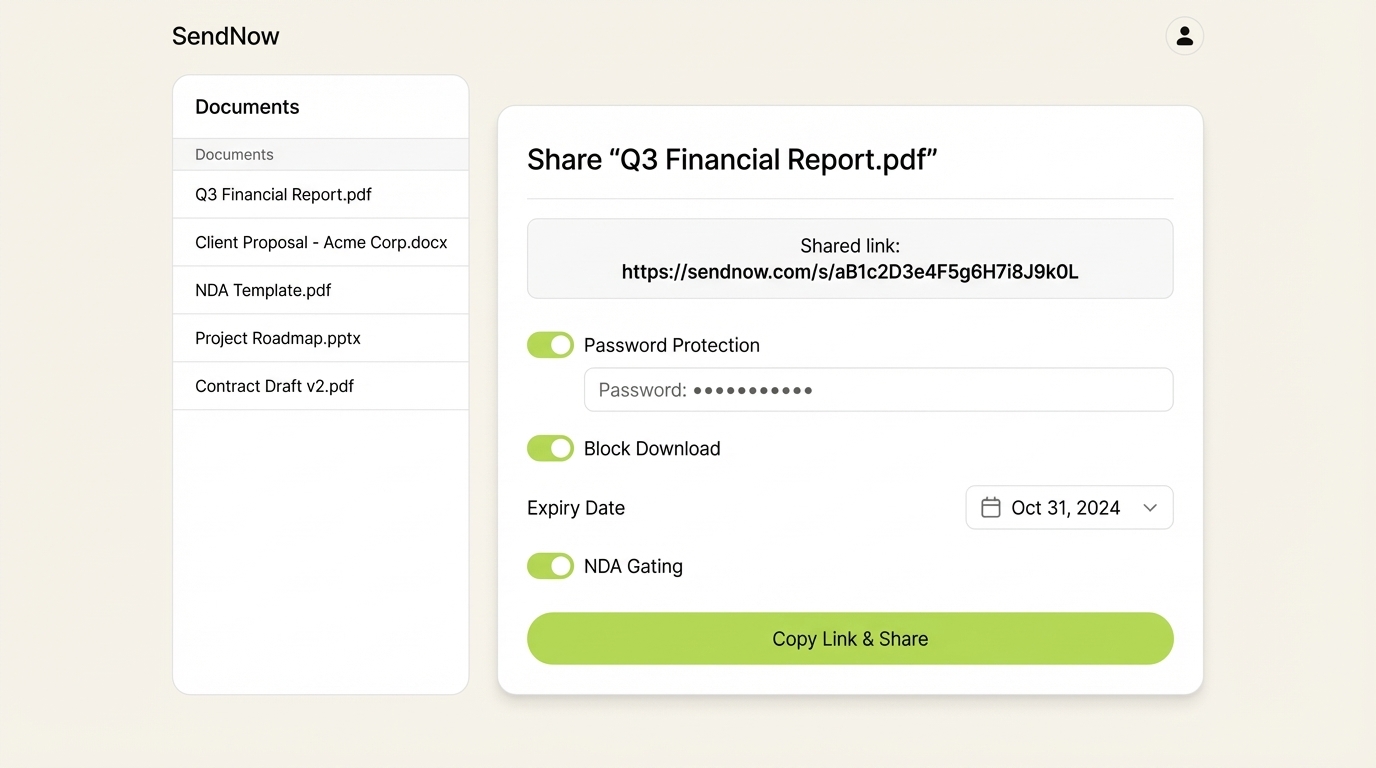
Download blocking. Serve the document as a view-only link. The recipient sees the content in their browser but cannot save a copy to their machine. Without a local file, forwarding is significantly harder.
Screenshot protection. Some platforms render documents in a way that defeats common screen-capture tools on desktop and mobile, making programmatic screenshots produce blank images.
Dynamic watermarking. Every page of the document displays the viewer's email address, IP address, and the current date and time, overlaid in a repeating pattern. If a page photograph appears somewhere it should not, the watermark identifies exactly who was responsible.
NDA gating. The recipient must accept a non-disclosure agreement before the document renders. This creates a legally binding consent record before any sensitive content is revealed — a critical safeguard for due diligence packages and investor materials.
Access revocation. If you suspect a document is being circulated, you revoke the link. Every previous recipient — forwarded or otherwise — loses access immediately.
SendNow combines all five of these controls in a single platform built specifically for finance professionals who cannot afford document leaks, pairing them with page-by-page analytics so you know exactly which pages a recipient spent time on and which they skipped.
5. What Is a Secure Client Portal?
A secure client portal is a branded, access-controlled web space where clients view, download (if permitted), and interact with documents you share with them — without those documents ever existing as loose email attachments.
Rather than sending a PDF attached to an email, you send a link to your portal. The portal can display your company branding, require the visitor to authenticate, and present a curated set of documents organized by folder or deal stage.
For finance teams specifically, a deal room — a portal configured for a single transaction or fundraise — is the standard vehicle for due diligence. It typically contains:
- Financial statements and models
- Pitch deck or information memorandum
- Legal documents and cap table
- Management team materials
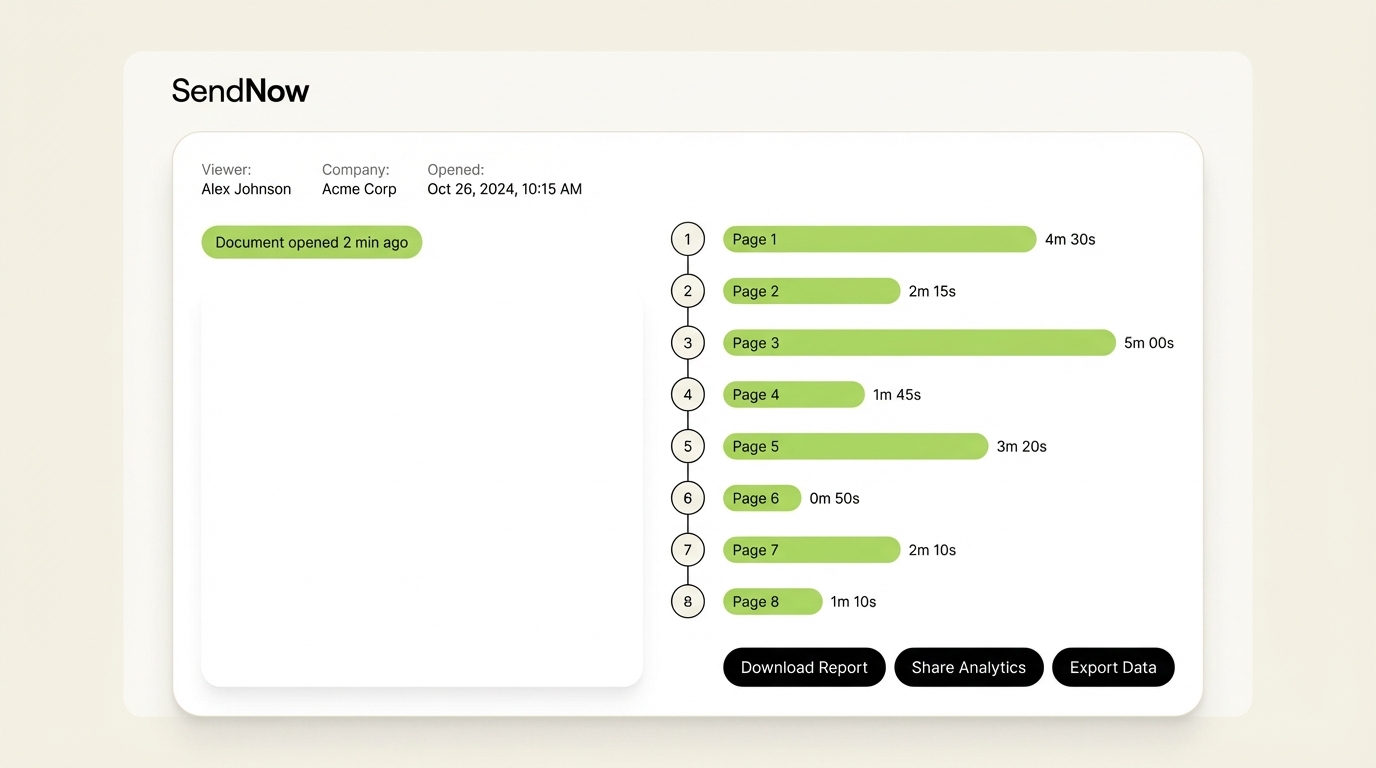
The portal logs every interaction: who accessed which document, on which date, for how long, and down to which page. That data is not available when you send a Dropbox link.

Branded portals also carry a professional signal. A VC receiving a polished deal room with your company name and color scheme treats the materials with more seriousness than a generic Google Drive folder. According to Sync, clients who receive documents through branded portals report higher perceived professionalism and trust — a meaningful differentiator in competitive deal processes.
6. How Do You Know If a Client Has Opened or Read Your File?
Traditional email attachments offer no reliable read receipts. The "delivered" confirmation tells you the email reached the recipient's server, not their eyes. Standard delivery confirmation does not indicate whether the attachment was opened, forwarded, or ignored.
Purpose-built secure document sharing platforms solve this problem with link-based delivery and real-time analytics.
When you share a document via a tracked link:
- You receive an instant notification the moment the link is opened, including the viewer's device type and location.
- Page-by-page analytics show you exactly how long the viewer spent on each slide or page.
- If a second person opens the link from a different IP address, a new viewing session is created, flagging a potential forward.
- An AI engagement score aggregates all of this data into a single signal — for example, a high score if the recipient spent significant time on the financial model pages.
This intelligence has direct commercial value. A sales team that knows a prospect read every page of a proposal twice is in a very different follow-up position than one that simply hopes the email was read. For a VC preparing to follow up with a portfolio company, knowing which investors opened the update and dwelled on the EBITDA slide informs the entire investor relations conversation.
The key is choosing a platform that offers genuine page-level analytics, not just a "link opened" binary flag. Not all document sharing tools provide this depth of visibility.
7. What Is the Difference Between a Secure Link and a Password-Protected File?
A password-protected file and a secure sharing link are fundamentally different architectures with very different security properties.
Password-protected file (e.g., a locked PDF):
- The password is embedded in the file itself.
- Once the recipient has the file and the password, they can share both freely.
- You cannot revoke access to a file already in someone's possession.
- Modern cracking tools can defeat many PDF password implementations.
- There is no audit trail of who opened the file or when.
Secure sharing link:
- The document lives on a server you control.
- Access to the link can be revoked at any time.
- You can layer additional authentication (email verification, password, NDA gate) on top of the link.
- Every access event is logged server-side, creating an immutable audit trail.
- Even if the link is forwarded, you see the new viewer and can cut off access.
From a GDPR and regulatory compliance perspective, the secure link model is significantly stronger. It demonstrates that you applied ongoing, active controls to the data — not just a one-time password you emailed alongside the file.
The MOVEit breach of 2023, which affected 77 million people across 2,000 organizations, illustrated how file transfer tools without robust access control layers become single points of catastrophic failure. A link-based model with layered controls does not eliminate risk, but it distributes and minimizes it dramatically.
Conclusion
Secure file sharing with clients in 2026 requires more than a password on a PDF. It requires AES-256 encryption, granular access controls, real-time audit trails, revocation capability, and the visibility to know not just whether a document was opened — but which pages mattered to the recipient and whether it was forwarded to unauthorized parties.
For finance professionals sharing pitch decks, due diligence packs, and financial models, the stakes of getting this wrong are too high to rely on email attachments or generic cloud storage.
SendNow was built for exactly this context. It combines military-grade encryption, screenshot protection, dynamic watermarking, NDA gating, branded deal rooms, and AI-powered engagement scoring in a single platform, starting at $9/month. No credit card is required to try it. If you share sensitive documents with clients and currently rely on email attachments or untracked links, it is worth seeing what controlled, audited, secure sharing actually looks like.

Keep Reading
- Secure Document Sharing for Finance Teams: Best Practices
- Email Attachments vs Secure Links: Why Finance Teams Are Switching
- How to Block Screenshots on Confidential Business Documents
- NDA Best Practices for Sharing Confidential Financial Documents
Start your free trial at sendnow.live — no credit card required.
About the Author: Rifana Hameem
Rifana is the founder of SendNow. She leads the team in building secure, compliant, and analytics-rich document sharing tools for finance and professional teams worldwide.
Connect on LinkedIn