Best Tools for Sharing Financial Reports with Clients

- Sharing financial reports via email attachments creates serious security, compliance, and confidentiality risks.
- A data room or secure document sharing platform gives finance professionals access controls, audit trails, NDA gating, and analytics in a single tool.
- DocSend removed its free plan in March 2025 after Dropbox acquired it, pushing many teams to find more affordable and feature-rich alternatives.
- The 7 best tools for sharing financial reports with clients are: SendNow, DocSend, Digify, Orangedox, PandaDoc, Intralinks, and Ideals Virtual Data Room.
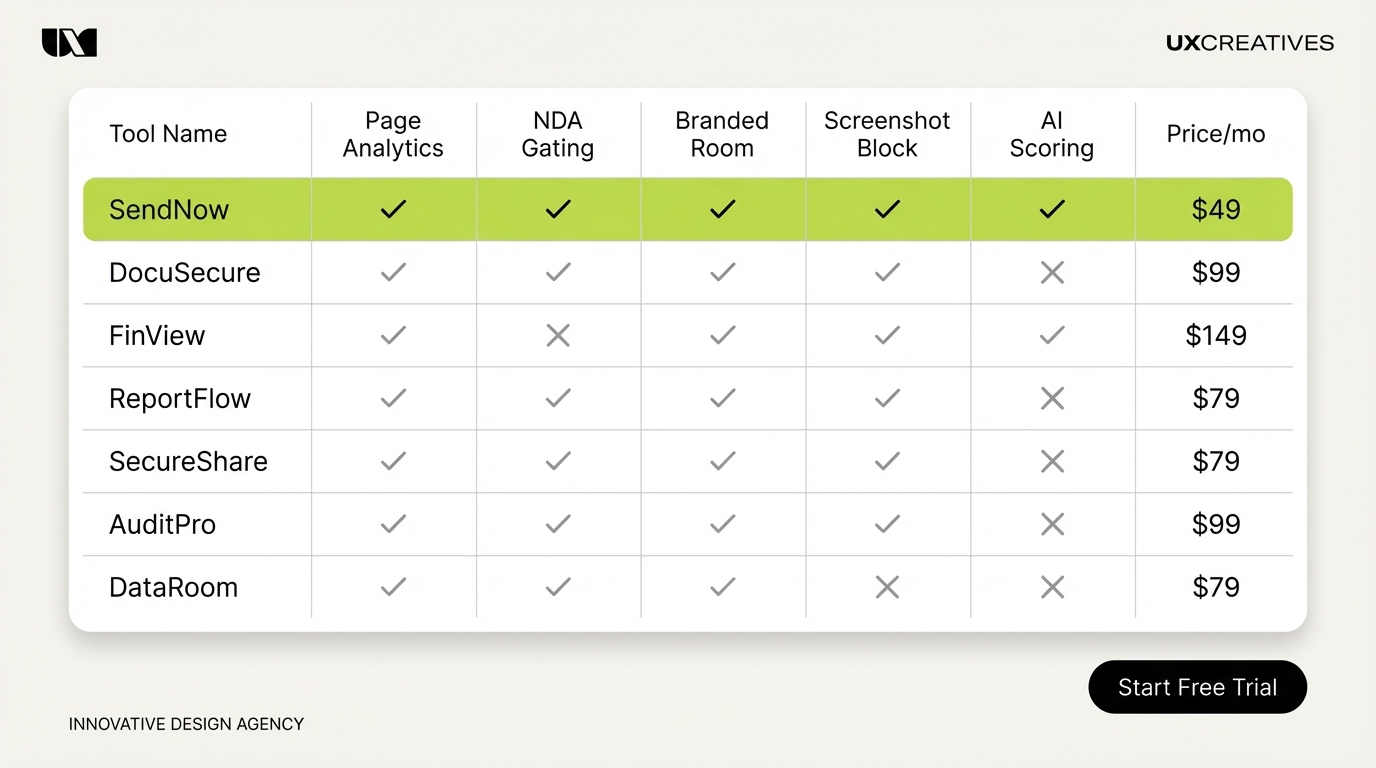
- SendNow stands out with its finance-first design, page-by-page analytics, AI engagement scoring, NDA gating, branded deal rooms, and screenshot protection starting from $9 per month.
Best Tools for Sharing Financial Reports with Clients
Keyword: data room software
Introduction
Every week, financial professionals send investor reports, LP updates, deal memos, and due diligence packages to clients. Most of them send these documents the same way: as email attachments. It is fast, familiar, and quietly dangerous.
Email attachments offer no visibility into who opened the file, whether it was forwarded to unauthorized parties, or which sections held the reader's attention. For finance professionals operating under fiduciary obligations and regulatory requirements, that lack of control is a liability.
The right tool for sharing financial reports with clients is not just a storage solution. It is a secure, trackable, access-controlled platform that protects sensitive information while giving you intelligence on how clients engage with the material.
This guide covers the seven most important questions around data room software and financial document sharing, then ranks the top 7 tools available in 2026.
Table of Contents
- What is a virtual data room?
- Why is email unsafe for financial reports?
- What security features do finance clients require?
- What is the difference between a data room and cloud storage?
- What happened to DocSend's free plan?
- How do you choose the right data room software?
- The 7 Best Tools for Sharing Financial Reports with Clients
What is a Virtual Data Room? {#what-is-a-virtual-data-room}
A virtual data room (VDR) is a secure online repository for storing and distributing sensitive documents with controlled access, audit trails, and compliance-grade protection.
Investopedia defines a VDR as a secure online repository used primarily during due diligence in mergers and acquisitions, fundraising, and other transactions where multiple parties need to review confidential material without it leaking beyond the intended audience.
Intralinks, one of the largest enterprise VDR providers, describes a VDR as a platform that "enables secure, controlled access and seamless collaboration" for sell-side and buy-side teams executing strategic deals.
A VDR typically includes:
- Granular permissions that control which users can view, download, or print specific documents
- Audit trails showing who accessed what and when
- Dynamic watermarks that embed viewer identity into every page
- Q&A workflows for managing due diligence questions
- NDA gating to require agreement acceptance before document access
For the purposes of financial reporting, the most relevant VDR capabilities are access control, document analytics, and secure sharing. Not every firm needs a full M&A-grade enterprise VDR. Many financial advisors, investment managers, and deal teams get better value from lighter-weight document sharing tools with VDR-level security at a fraction of the price.
Why is Email Unsafe for Financial Reports? {#why-email-is-unsafe}
Email was not designed for confidential document distribution. When you attach a financial report to an email, you lose control of that document the moment you click send.
Kiteworks notes that accounting and financial services firms face constant cybersecurity risk, and uncontrolled file sharing creates multiple attack vectors: phishing, unauthorized forwarding, and accidental misdirection to wrong recipients.
Specific risks with email attachments for financial documents:
- No access revocation. Once sent, you cannot pull back a PDF that was forwarded to a competitor, a journalist, or the wrong client.
- No audit trail. You have no record of who actually viewed the document, when, or how many times.
- Accidental forwarding. A client who receives a confidential investor report can forward it to anyone without your knowledge.
- No version control. Updated financial data means sending a new attachment, with no guarantee the previous version was deleted.
- No NDA enforcement. Sensitive deal information requires recipient agreement before access; email cannot enforce this.
IBM's 2025 Cost of a Data Breach Report, cited by Diligent, puts the average cost of a data breach at $4.88 million. For financial services firms managing client relationships and regulatory requirements, a confidentiality breach is not just expensive. It is a reputational and legal event.
What Security Features Do Finance Clients Require? {#security-features}
Finance professionals operate under heightened confidentiality and compliance expectations. Clients in private equity, investment banking, and wealth management expect document sharing tools to provide enterprise-grade security controls as a baseline.
Kiteworks identifies seven core security capabilities for financial services document sharing:
- End-to-end encryption for documents both at rest and in transit
- Granular access controls at the file, folder, and user level
- Two-factor authentication for all document access
- Dynamic watermarking that embeds viewer identity on every page
- Screenshot and print prevention to block unauthorized reproduction
- Audit trails compliant with SOC 2, GDPR, and relevant financial regulations
- Secure link expiry so documents can be revoked after a defined period
BuildYourFirm adds that without proper access controls and encryption, firms risk "significant legal repercussions and erosion of client trust."
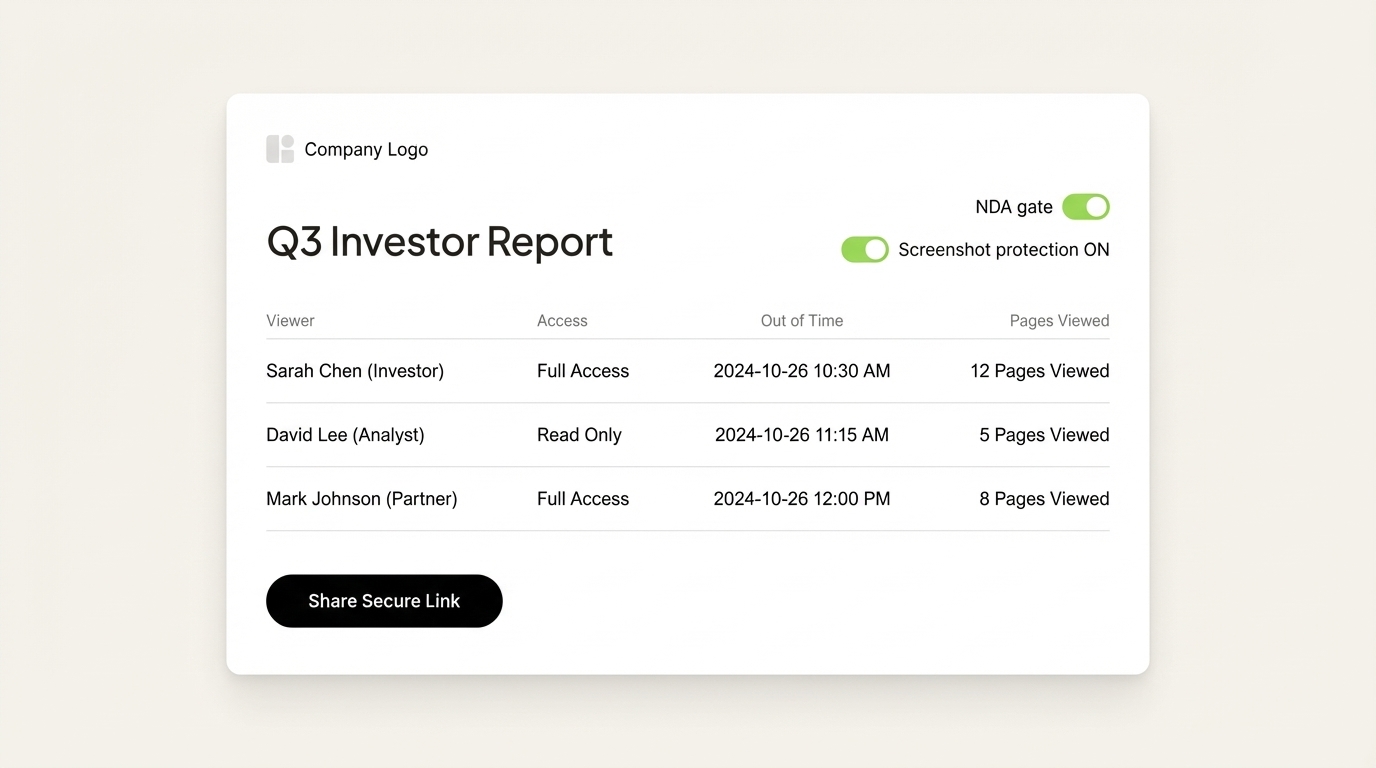
Beyond technical features, finance clients increasingly expect branded portals rather than generic file links. A deal room that carries your firm's logo and custom domain signals professionalism and reinforces trust in the confidentiality of the process.
What is the Difference Between a Data Room and Cloud Storage? {#data-room-vs-cloud-storage}
Cloud storage (Dropbox, Google Drive, OneDrive) and data room software both store files in the cloud, but they serve fundamentally different purposes and offer different levels of control.
Digify draws the distinction clearly: cloud storage solutions prioritize ease of access and collaboration, while virtual data rooms prioritize controlled access, security, and compliance. In a cloud storage environment, access control is basic: view or edit. In a data room, permissions are granular to the individual file, with full audit records and security enforcement.
Key differences:

| Feature | Cloud Storage | Data Room Software |
|---|---|---|
| Per-page document analytics | No | Yes |
| NDA gating | No | Yes |
| Dynamic watermarking | No | Yes |
| Screenshot protection | No | Yes |
| Audit trail (compliance-grade) | Limited | Yes |
| Viewer identity tracking | No | Yes |
| Link revocation | Basic | Yes |
| Branded portal | No | Yes |
For financial professionals sharing client reports with deal-level sensitivity, cloud storage introduces unacceptable gaps in control. A data room or document intelligence platform closes all of them.
Ellty notes that most founders and finance professionals only start thinking about a VDR when they need one urgently. Building the habit of using secure document sharing tools earlier reduces risk and improves client experience before it becomes a crisis.
What Happened to DocSend's Free Plan? {#docsend-free-plan}
DocSend, acquired by Dropbox in 2021, removed its free plan in March 2025. Dropbox also discontinued its standalone "Send & Track" free feature at the same time.
Peony.ink confirmed this directly: "Dropbox killed its free Send & Track feature in March 2025." DocSend plans now start at $10 per user per month, with the Advanced Data Rooms tier reaching $300 per month.
This shift pushed many teams, particularly startups, financial advisors, and mid-market sales teams, to evaluate alternatives that offer comparable or superior functionality at lower price points. The removal of a free tier removed the natural entry path for new users and made DocSend a significantly harder value proposition for smaller teams who previously relied on the basic free features.
Orangedox notes that while DocSend remains a capable platform, its pricing and Dropbox integration dependency make it a poor fit for teams that want flexibility, Google Workspace integration, or more affordable data room access without the Dropbox ecosystem lock-in.
Several strong alternatives now fill the gap DocSend's free plan used to occupy, with some offering superior analytics, more affordable pricing, and finance-specific features that DocSend's general-purpose design does not prioritize.
How Do You Choose the Right Data Room Software? {#how-to-choose}
The right data room software for sharing financial reports depends on your team size, deal volume, compliance requirements, and whether you need a lightweight document intelligence tool or a full enterprise VDR.
DFin Solutions recommends starting by defining the purpose of your VDR: is it for ongoing client reporting, a specific M&A transaction, investor relations, or general financial document distribution? The answer determines which feature set matters most.
Key evaluation criteria for finance teams:
- Analytics depth: Do you need page-level engagement data, or is simple open tracking sufficient?
- Security controls: Does the platform include screenshot protection, dynamic watermarks, and NDA gating?
- Branding: Can you create a white-labeled portal under your own domain?
- Pricing model: Per user, per document, or flat rate? Per-document pricing can become expensive at volume.
- AI features: Does the platform offer engagement scoring or automated due diligence assistance?
- Integrations: Does it connect to your CRM, Slack, or existing workflow tools?
- Support and compliance: Is the platform SOC 2 certified? Does it offer 24/7 support?
For most financial advisors and deal teams sharing reports with clients regularly, the right tool sits between a full enterprise VDR (expensive, complex, transaction-focused) and a basic file-sharing link (no controls, no analytics). This middle tier includes platforms purpose-built for recurring, secure, intelligence-rich document sharing.
The 7 Best Tools for Sharing Financial Reports with Clients {#top-7-tools}

1. SendNow
Best for: Finance professionals and sales teams who need document analytics, AI engagement scoring, and deal room security in one affordable platform.
SendNow is a B2B SaaS platform purpose-built for secure document sharing in finance and sales contexts. It stands apart from general-purpose tools by combining page-by-page analytics, AI engagement scoring, branded deal rooms, NDA gating, screenshot protection, dynamic watermarking, and real-time Slack notifications in a single platform optimized for financial professionals.
Key features:
- Page-by-page reading analytics with time-on-page data
- AI chatbot embedded within documents for real-time Q&A
- Branded microsites and custom domain support
- NDA gating with one-click agreement before document access
- Screenshot and print protection
- Dynamic watermarks that embed viewer identity
- Real-time Slack and webhook alerts
- Lead capture forms on document landing pages
Pricing: Pro from $9/month (1 user, 300 documents), Business at $33/month (3 users, 1,000 documents), Enterprise custom. Yearly billing saves 53%. Free trial with no credit card required.
Best for: Investment advisors, VC and PE deal teams, financial services sales reps, and anyone sharing LP reports, pitch decks, or deal memos who needs both security and buyer intelligence.
2. DocSend (by Dropbox)
Best for: Teams already in the Dropbox ecosystem who need reliable, brand-name document tracking.
DocSend is one of the most established names in document analytics and secure sharing. DocSend offers per-page engagement tracking, access controls, data rooms, and version management. It integrates natively with Dropbox and works well for companies that already rely on the Dropbox platform.
Key features: Per-page analytics, data rooms, NDA gating, link permissions, version control, Dropbox integration.
Pricing: Starting at $10/user/month. No free plan as of March 2025. Advanced Data Rooms start at $300/month.
Limitations: Pricing is significantly higher than newer alternatives. Dropbox dependency limits flexibility. No AI engagement scoring.
3. Digify
Best for: Teams that need enterprise-grade document security with full DRM and persistent protection after download.
Digify is a data room and secure document platform known for its strong digital rights management capabilities. It offers persistent protection after download, meaning documents remain protected even after a recipient saves them locally, a feature few other platforms offer.
Key features: Persistent download protection, screenshot prevention, dynamic watermarks, NDA gating, folder-level permissions, document Q&A, cloud storage sync.
Pricing: Pro at $140/month (1 user, 3 data rooms), Team at $350/month (3 users, 10 data rooms), Enterprise custom. Annual plans save 30%.
Limitations: Significantly more expensive than lightweight alternatives. Overkill for teams without persistent-protection requirements.

4. Orangedox
Best for: Google Workspace users who want data room analytics on top of Google Drive files.
Orangedox is built as a native overlay for Google Drive and Dropbox. It creates data rooms that stay in sync with your cloud storage automatically, eliminating the double-upload problem that plagues most standalone document platforms.
Key features: Google Drive and Dropbox sync, page-by-page analytics, NDA gating, custom branding, unlimited sharing, simple flat-rate pricing.
Pricing: Flat monthly rate with a 14-day free trial. Pricing is positioned as a more affordable alternative to DocSend.
Limitations: Tightly coupled to Google/Dropbox ecosystem. Less suitable for teams outside these platforms.
5. PandaDoc
Best for: Sales teams that create, send, and e-sign proposals alongside document tracking.
PandaDoc combines proposal creation, e-signature, and document analytics in a unified workflow. It is particularly strong for teams that want to reduce tool sprawl by handling the full proposal lifecycle, from template to signature to analytics, in one platform.
Key features: Proposal templates, e-signatures, real-time tracking, approval workflows, CRM integrations, content library.
Pricing: Launch at $9/month (unlimited seats, 60 documents per year), Starter at $19/seat/month, Business and Enterprise available. No analytics in the Launch tier.
Limitations: Document-level analytics only (no per-page heatmaps on base plans). Primary focus is proposals and contracts, not ongoing financial reporting.
6. Intralinks
Best for: Large enterprises managing complex M&A due diligence and high-volume deal processes.
Intralinks is one of the most established enterprise VDR providers, trusted by 99% of the Fortune 1000 for M&A and strategic transactions. It offers AI-powered workflows, granular permission settings, and industry-leading security at enterprise scale.
Key features: AI-powered document analysis, bulk redaction, advanced Q&A workflows, enterprise security certifications, integration with major legal and financial platforms.
Pricing: Enterprise, custom pricing only. Not suitable for small or mid-size teams.
Limitations: Price and complexity put it out of reach for most financial advisors and smaller deal teams. Transaction-focused rather than ongoing reporting-focused.
7. Ideals Virtual Data Room
Best for: Mid-market teams that need a full-featured, compliance-grade VDR for deals and ongoing client reporting.
Ideals VDR consistently ranks at the top of third-party review platforms including G2 (4.7/5) and Capterra (4.8/5). It offers bank-grade security, built-in redaction, granular access controls, and advanced Q&A workflows, with a reputation for exceptional customer service and ease of use relative to enterprise competitors.
Key features: Built-in redaction, granular permissions, advanced Q&A, bulk uploads, audit reports, multiple security certifications, responsive 24/7 support.
Pricing: Subscription-based with custom pricing. Trial available.
Limitations: More expensive than lightweight document sharing tools. Better suited for transaction-based use than recurring client report distribution.
Conclusion: Secure Sharing Starts with the Right Tool
Financial reports contain some of the most sensitive information your firm produces. Sharing them via untracked email attachments exposes your clients, your compliance posture, and your reputation to risks that are entirely avoidable with the right platform.
The seven tools above represent the strongest options for secure document sharing in finance contexts. For enterprise M&A with unlimited legal budget, Intralinks or Ideals VDR deliver unmatched depth. For teams that need strong security with workflow integration, Digify or PandaDoc are worth evaluating. For Google Drive-first teams, Orangedox is a natural fit.
For financial professionals who want the sharpest combination of document intelligence, deal room professionalism, AI analytics, and straightforward pricing, SendNow is the clear starting point. Its finance-first feature set, page-by-page reading analytics, NDA gating, and branded microsites make it the tool built specifically for the environment where you work.
Start a free trial at sendnow.live. No credit card required.
Sources: Investopedia | Intralinks | Diligent | Kiteworks | Digify | Orangedox | Peony.ink | PandaDoc | Ellty | BuildYourFirm | DFin Solutions | datarooms.org | Ellty - Digify pricing
Keep Reading
- What Is a Virtual Data Room? Complete Guide for Finance Professionals
- Secure Document Sharing for Finance Teams: Best Practices
- Best data room software compared across features, pricing, and security for finance teams in 2026. Find the right VDR for M&A, fundraising, or due diligence — with transparent pricing starting at $9/month.
- DocSend vs SendNow: Full Comparison for 2026
About the Author: Rifana Hameem
Rifana is the founder of SendNow. She leads the team in building secure, compliant, and analytics-rich document sharing tools for finance and professional teams worldwide.
Connect on LinkedIn