
Track visitors and engagement in MicroSite Analytics
Every MicroSite view, file click, and NDA signature is logged automatically. Open Analytics from your dashboard to see who's looking at what.
Open Analytics
From your dashboard, open a MicroSite's analytics to see its stats.
Read the top-line numbers
Total Views, Unique Visitors, Avg. Time, and File Clicks summarize activity across the whole MicroSite.

Check File engagement and Top countries
The File engagement panel ranks your files by time spent; Top countries breaks visits down by visitor location.
Drill into a visitor
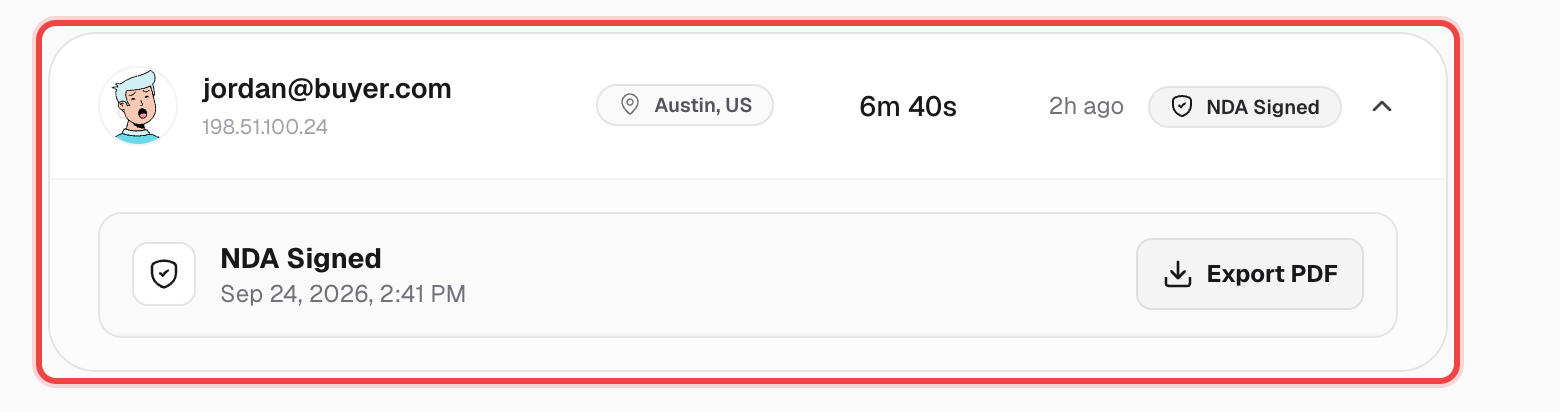
Switch to the Visitors tab and click any row to expand it. If that visitor signed an NDA, the full record — name, email, IP, timestamp, and the exact agreement text — is right there, with a one-click Export PDF.
Browse Views, File Clicks, and NDA as a log
The remaining tabs list every individual view, file click, and NDA signature as a flat, filterable audit trail.
Good to know
- MicroSite Analytics needs a MicroSite Pro plan or higher.
- An NDA record exported as PDF includes the signer's name, email, IP address, location, timestamp, and the full agreement text they agreed to.
- Analytics counts direct link visits and embedded iframe views together, with no way to separate the two.