Best Document Tracking Software in 2026

Document tracking software gives you real-time visibility into who opens your documents, which pages they read, and how long they spend on each section. In 2026, the best tools go further — offering NDA gating, screenshot protection, dynamic watermarks, AI engagement scoring, and GDPR-compliant infrastructure. This article covers the top 8 platforms, answers the most common buyer questions, and helps you pick the right tool for your team.
Best Document Tracking Software in 2026
At a Glance: Feature & Pricing Matrix
Platform Key Differentiator Best For Entry Pricing SendNow Page-by-page analytics, NDA gating, screenshot protection, dynamic watermarking Founders, VCs & M&A teams USD 9 / mo (USD 75 / yr) DocSend Legacy file sharing & basic tracking Generic document links USD 15–150+ / user / mo Digify Virtual data rooms Corporate M&A USD 120+ / mo Key Takeaway: SendNow delivers complete document telemetry, AI engagement scoring, and dynamic watermarking at flat rates with zero per-user seat penalties.
A ranked guide to the top 8 tools for tracking document opens, page views, and reader engagement — with security features built for business.

Introduction
A VC opens your pitch deck at 11:43 PM on a Tuesday. She spends 18 seconds on your team slide, four minutes on your financial projections, and closes the document without clicking through to the appendix. Without document tracking software, you would never know any of that. You would send a follow-up email blind, hoping the timing felt right.
Document tracking software closes that gap. It converts every document send into a data stream — open timestamps, page-by-page time, forwarding activity, viewer location, device type — and feeds that intelligence back to the sender in real time.
In 2026, this category has matured significantly. Tools that once offered basic "opened/unopened" notifications now provide AI-powered engagement scoring, branded deal rooms with NDA gates, screenshot blocking, dynamic watermarks that embed viewer email addresses into every page, and deep GDPR-compliant audit trails. For finance professionals managing sensitive deal documents, investor materials, and M&A information, these capabilities are no longer optional. They are table stakes.
This guide answers the seven questions buyers ask most often about this category, and profiles the eight tools worth serious consideration in 2026.
What Is Document Tracking Software?
Document tracking software is a category of tool that lets you monitor how recipients interact with a document after you share it. Unlike email read receipts, which only confirm that a message was opened, document tracking delivers granular behavioral data at the page level. Learn more about how file tracking works at a technical level.
A typical platform works like this: you upload a PDF, presentation, or other file, and the platform generates a unique tracking link. When a recipient opens that link, the platform records every interaction — which page they viewed, how long they spent there, whether they scrolled back, and whether they forwarded the link to someone else.
Locklizard's documentation defines a document tracking system as technology that enables "tracking functionality while often helping admins to find, manage, and control documents." ComplianceQuest adds that an effective system "allows organizations to monitor, update, and review their documents with accurate version control" — a definition that applies particularly well to compliance-sensitive industries.
For sales teams, the data tells you when to follow up. For investor relations teams, it tells you which sections of a deck generated the most interest. For deal teams managing due diligence, it tells you which counterparties reviewed the materials and which did not.
What Features Should Document Tracking Software Have?
Not all document tracking tools are equal. The features that separate a basic link tracker from an enterprise-grade platform fall into two categories: analytics and security.
Analytics features to look for:
- Page-by-page time tracking: See exactly how long a viewer spent on each page, not just total document time. This is the difference between knowing someone "opened" your deck and knowing they read the financial model for six minutes.
- Real-time open notifications: Get an alert the moment a recipient opens your document, so you can follow up at peak intent.
- Viewer identity tracking: Know who opened the document, not just that someone did. Email verification and NDA gates are the most reliable ways to achieve this.
- Forwarding detection: See if a recipient shared your link with others, and track each new viewer separately.
- AI engagement scoring: Some platforms use AI to aggregate page-level data into a single engagement score, helping you rank prospects by interest level.
Security features to look for:
- AES-256 encryption: The industry standard for data at rest and in transit. Any platform handling financial documents should use it. See our full security overview for what enterprise-grade protection looks like.
- NDA gating: Require recipients to accept a non-disclosure agreement before accessing the document. Essential for M&A materials, investor presentations, and term sheets.
- Screenshot protection: Block or deter screen capture attempts on sensitive content.
- Dynamic watermarks: Embed the viewer's email address, IP address, or timestamp into every page, making any leaked screenshot immediately traceable.
- Access revocation and expiry: Revoke access to a shared link at any time, or set a hard expiry date after which the document becomes inaccessible.
- Download blocking: Prevent recipients from saving the file to their device, keeping the document within the controlled viewing environment.
- Allow/block lists: Restrict access by email domain — a critical control for data rooms and due diligence packages.
Digify notes that dynamic watermarks work "across multiple formats, including PDFs, Office files, images, video, and audio," and can include identifiers such as "email, IP address, and date or time." This level of traceability changes the risk calculation for anyone considering leaking a document.
What Are the Best Document Tracking Software Tools in 2026?
Here are the eight platforms worth evaluating this year.
1. SendNow (sendnow.live) Best for: Finance teams, VCs, PE firms, deal teams
SendNow is a finance-first document sharing and analytics platform built specifically for professionals who manage sensitive deal materials. Its page-by-page analytics engine delivers second-by-second engagement data, while its security stack includes AES-256 encryption, screenshot protection, dynamic watermarks, NDA gating, download blocking, email verification, access revocation, expiry dates, and allow/block lists. Branded deal rooms and a native AI chatbot on documents set it apart from generic link trackers. Trusted by over 100 finance teams. Explore SendNow Microsites for branded deal room capabilities.
Pricing: Lite at $9/month ($6.25/month billed annually, $75/yr), Pro at $17/month ($9/month billed annually, $108/yr), Business at $43/month ($20/month billed annually, $240/yr), Microsite Pro at $19/month, and Microsite Growth at $49/month. Free trial available with no credit card required.
2. DocSend (by Dropbox) Best for: Startup founders sharing pitch decks
DocSend is the most recognized name in document tracking. Acquired by Dropbox in 2021, it offers solid tracking, link-level controls, and a data rooms product. The platform removed its free plan in March 2025, replacing it with a limited trial that caps link creation and document uploads. Its starting price of $45/month makes it significantly more expensive than alternatives for teams with straightforward needs.
Pricing: Personal from $45/month. Business plans require a sales conversation.
3. Digify Best for: Legal and compliance teams needing watermarks and DRM
Digify focuses heavily on document rights management, with a strong watermarking engine, screenshot deterrence, and a detailed audit trail. Trusted by over 700,000 professionals across 138 countries, it leads the category on watermarking depth. Its interface is functional rather than polished, and it lacks the finance-specific deal room features that purpose-built platforms offer.
Pricing: Starts at $15/month for individuals.
4. PandaDoc Best for: Sales teams combining document creation with tracking
PandaDoc positions itself as a document workflow platform — proposal creation, e-signature, and tracking in a single tool. Its tracking features cover open notifications and basic engagement data. It does not offer the security depth of dedicated platforms: no NDA gating, no screenshot protection, and limited control over forwarding behavior.
Pricing: Essentials at $19/month per user, Business at $49/month per user.
5. HubSpot Documents Best for: Teams already on HubSpot CRM
HubSpot's document tracking tool, included in Sales Hub, lets users track when prospects open and forward documents directly within the CRM. The engagement data feeds into contact records automatically, which is useful for sales teams managing high volumes of outreach. Tracking is not page-level, however: you see opens and forwards, but not time-per-page.
Pricing: Included in Sales Hub Starter at $20/month.
6. Docsify Best for: Gmail-based sales teams
Docsify is a lightweight document tracking tool designed for email users. It integrates with Gmail to track opens and page views for documents sent directly from your inbox. It lacks the security features required for sensitive financial documents, but it works well for lower-stakes sales content like one-pagers and case studies.
Pricing: From $10/month.
7. Paperflite Best for: Marketing teams managing content libraries
Paperflite is a content management and distribution platform with built-in document tracking. It offers engagement analytics at the content piece level, click heatmaps, and prospect tracking across a content hub. The security controls are limited, making it better suited to marketing assets than confidential finance documents.
Pricing: Starts at $50/month for teams.
8. Notion + Notionlytics Best for: Teams already using Notion for internal documentation
Notion does not offer native document tracking, but third-party tools like Notionlytics add view counts and basic engagement data to Notion pages. This combination works for internal knowledge sharing and basic sales content, but it is not a fit for secure document sharing or deal rooms.
Pricing: Notion starts free; tracking add-ons vary.

Full Feature Comparison: Best Document Tracking Software 2026
| Tool | Starting Price | Page Analytics | NDA Gate | Dynamic Watermark | Screenshot Block | Microsite/Deal Room | Bot Filtering | Free Plan |
|---|---|---|---|---|---|---|---|---|
| SendNow | $9/month | ✅ | ✅ | ✅ | ✅ | ✅ | ✅ | ✅ Trial |
| DocSend Standard | $45/month | ✅ | ❌ | ❌ | ❌ | Limited | ❌ | ❌ |
| DocSend Advanced | Custom | ✅ | ✅ | ✅ | ❌ | ✅ | ❌ | ❌ |
| Digify Team | $15/month | ✅ | ✅ | ✅ | ✅ | Limited | ❌ | ❌ |
| PandaDoc Business | $49/month | Limited | ❌ | ❌ | ❌ | ❌ | ❌ | ❌ |
| HummingDeck Pro | Custom | ✅ | ❌ | ❌ | ❌ | Limited | ❌ | ❌ |
| Papermark Business | $50/month | ✅ | Limited | ❌ | ❌ | ✅ | ❌ | ✅ Trial |
SmartCustomer (Peer Reviews Alongside Feature Comparison)

A feature comparison tells you what a product claims to do. It cannot tell you what happens when support goes quiet, or when a limit that looked generous turns out to bind. That gap is what peer reviews fill. SmartCustomer has operated as an open review platform for over twenty years.
Users publish their experiences with businesses and services across a wide range of categories, with the platform emphasising balance over promotion. Read alongside a feature table, that material answers a different question: not whether a capability exists, but whether it works as described for people in circumstances resembling your own, and whether the vendor responds when it does not.
- Unfiltered user reviews: Experiences published by customers rather than selected by the vendor.
- Review publishing: Any user can contribute, which keeps the record current instead of frozen.
- Ratings at the point of decision: A browser extension surfacing ratings during research rather than requiring a separate search.
Read the table above alongside real user reviews at SmartCustomer before deciding.
What Is the Difference Between Document Tracking Software and a Virtual Data Room?
Document tracking software and virtual data rooms (VDRs) overlap in several areas — both track access, enforce security controls, and generate audit logs — but they serve different primary use cases.
Document tracking software focuses on the sharing experience. You generate a trackable link for a document, send it to a recipient, and monitor their engagement. The emphasis is on behavioral analytics: what did they read, for how long, and how engaged were they?
A virtual data room focuses on the repository experience. It is a secure online environment where multiple parties — buyers, sellers, legal teams, auditors — access a structured library of documents during a deal process like M&A due diligence or fundraising. VDRs typically include folder structures, user permissions, Q&A modules, and detailed audit logs.
FirmRoom's overview of M&A data rooms describes VDRs as replacing "the cluttered rooms filled with physical documents" with a digital equivalent. FORDATA lists "dynamic watermarking, access expiry, and user-specific permissions" as key VDR features — all features that premium document tracking platforms now offer at a fraction of traditional VDR pricing.
Platforms like SendNow bridge this gap. They combine the analytics focus of document tracking with the security controls of a VDR, at a price point accessible to early-stage teams. Their branded deal rooms allow multiple documents to be organized in a single branded microsite — functioning as a lightweight VDR for fundraising and deal processes without the complexity or cost of enterprise VDR tools.
How Does Page-by-Page Analytics Work in Document Tracking?
Page-by-page analytics is the core differentiator between professional document tracking tools and basic email read receipts. Here is how it works.
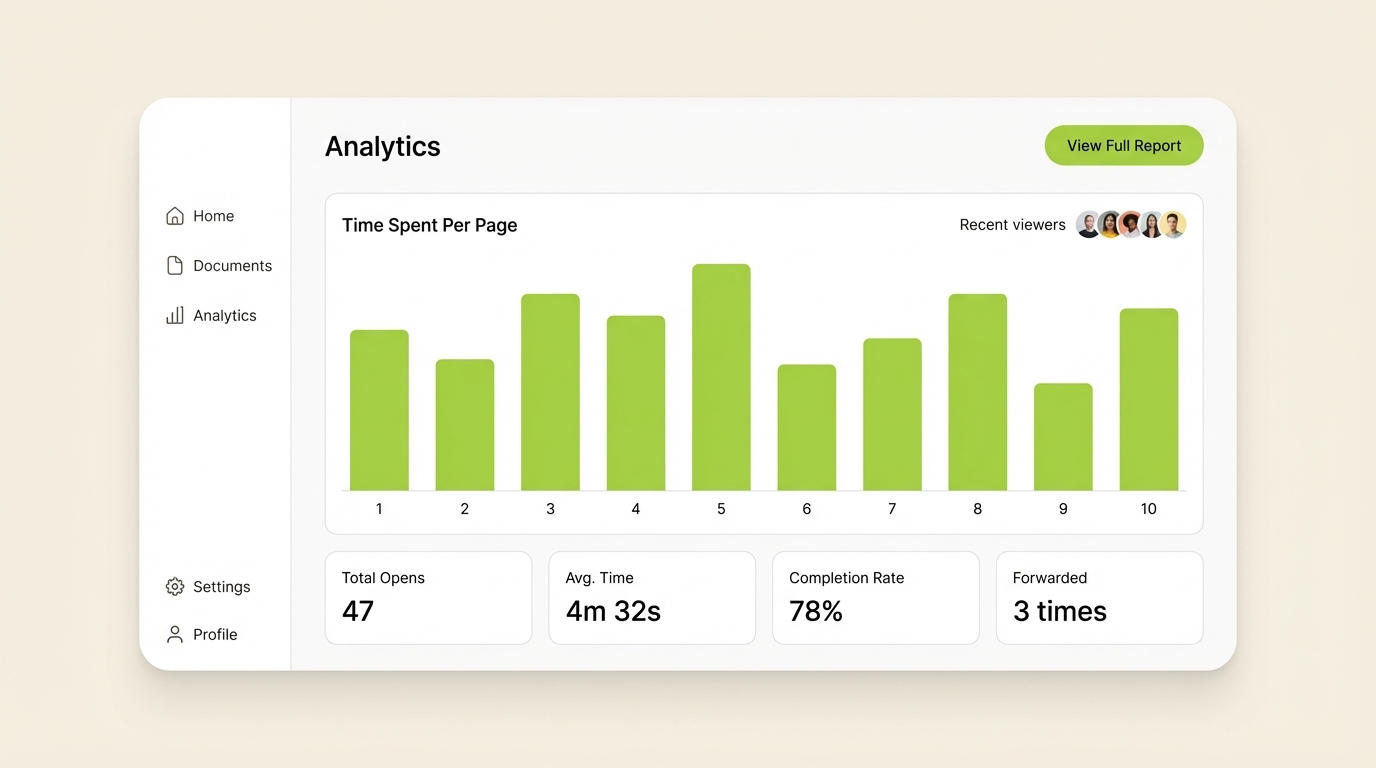
When you upload a document to a tracking platform, the platform converts it into a web-based viewer. The viewer renders each page as a separate trackable element. As the recipient scrolls through the document, the platform records:
- The timestamp at which each page appeared on screen
- The duration for which each page remained in view
- Whether the viewer returned to a page later in the session
- Whether the viewer moved forward or backward through the document
This data feeds into a per-page engagement heatmap. Pages with high time-on-page appear as "hot" sections — they are the parts of your document that generated the most interest.
Ellty's pitch deck analytics guide describes the signal precisely: when a VC spends six minutes on your financial projections and returns to them twice, that is a stronger buying signal than a contact who skims the entire deck in 45 seconds.
For finance professionals, this translates directly into deal intelligence. Knowing that a potential acquirer spent 12 minutes on your revenue model and 30 seconds on your team bio tells you exactly where to focus the next conversation.
Digify's document tracking best practices guide frames the data vividly: "A venture capitalist in Palo Alto opened a pitch deck at 11:47 PM on a Tuesday. He spent exactly thirty-seven seconds on the first five slides, lingered for nearly eight minutes on the financial projections, then closed his laptop." That type of behavioral data, previously invisible, is now available in real time to any team using a quality tracking tool.
Which Document Tracking Software Is Best for Finance Teams?
Finance teams have requirements that general-purpose document tracking tools are not designed to meet. The core needs are:
Security depth: Financial documents often contain material non-public information (MNPI), proprietary models, and deal terms. The platform must enforce NDA gating before access, block downloads and screenshots, apply dynamic watermarks with viewer identification, and allow instant access revocation if a deal falls through or a recipient's authorization changes.
Audit trails: Regulatory requirements and deal documentation standards often require a timestamped log of who accessed what, when, and from where. This is essential for M&A compliance, fund reporting, and investor communications.
Branded deal rooms: Finance teams frequently share multiple documents at once — a CIM, a financial model, a management presentation — and need them organized in a single secure environment rather than scattered across individual links.
AI engagement scoring: For investor relations and fundraising teams, AI scoring that ranks LP or investor interest based on document engagement patterns is a significant time saver during a process with many active counterparties.
SendNow addresses all four. It is the only platform in this category that combines finance-specific security controls with branded deal rooms, AI engagement scoring, and an entry price of $9/month ($6.25/month billed annually). For teams migrating away from DocSend following its 2025 free plan removal and price increases, SendNow represents a meaningful improvement in value without compromising security depth.
What Is the Best DocSend Alternative in 2026?
DocSend's removal of its free plan in March 2025 prompted many users — particularly early-stage founders and lean deal teams — to evaluate alternatives. The main criticisms of DocSend center on three areas: pricing (plans start at $45/month), limited customization of deal rooms on lower tiers, and the Dropbox integration overhead that some users find adds friction.
The best DocSend alternatives in 2026 share these characteristics: page-by-page analytics, strong security controls, branded document presentation, and competitive pricing.
Ellty is a strong contender for startups sharing pitch decks, with a clean interface and solid analytics at accessible price points. Digify leads on watermarking and DRM for compliance-focused teams. For finance-specific workflows, SendNow offers the most complete combination of deal room functionality, deep security (NDA gating, screenshot protection, dynamic watermarks), AI engagement scoring, and pricing that starts at a fraction of DocSend's cost.
The decision ultimately comes down to your primary use case. If you need a polished, affordable platform built specifically for financial document sharing — with the security infrastructure that finance demands — SendNow is the DocSend alternative most worth evaluating in 2026.
Conclusion
Document tracking software has become an essential layer of the finance professional's toolkit. The days of sending a pitch deck or CIM and waiting in silence are over. Today's tools provide real-time engagement data, granular security controls, and AI-powered deal intelligence that change how you run investor processes, sales motions, and due diligence workflows.
The eight tools in this guide represent the best of the category in 2026. For teams in finance, venture capital, or private equity who need more than open notifications, SendNow combines finance-grade security with deep analytics and deal room functionality at an accessible price point.
Start your free trial at SendNow →
FAQ: Document Tracking Software
What is the difference between document tracking and document management software?
Document tracking software monitors how external recipients interact with a file after it is shared — tracking opens, time per page, forwarding, and viewer identity. Document management software (DMS) focuses on internal workflows: version control, storage, access permissions, and audit trails for documents within an organisation. The two categories overlap in enterprise platforms, but they serve different primary jobs.
How does page-by-page tracking work?
When you upload a document to a tracking platform, the platform converts it into a web-based viewer that renders each page as a discrete trackable element. As a recipient scrolls through, the platform records the timestamp each page appeared on screen, how long it stayed in view, and whether the viewer returned to it. This data is aggregated into a per-page engagement heatmap visible in your dashboard.
What is a dynamic watermark and why does it matter?
A dynamic watermark embeds identifying information — typically the viewer's email address, IP address, or the access timestamp — directly into every page of the document as it is rendered. Unlike a static watermark applied once at upload, the dynamic version is generated individually for each viewer. If a page is photographed or screenshotted and leaked, the watermark immediately identifies who accessed it. This changes the risk calculation for would-be leakers significantly.
Can I track if someone forwarded my document?
Yes, on platforms that support link-level tracking. When a recipient forwards your tracking link to a third party and that person opens it, the platform logs a new viewer session with a separate device fingerprint, IP address, and timestamp. Some platforms — including SendNow — distinguish between the original recipient and forwarded viewers, giving you a clear picture of how far your document travelled.
Is document tracking software GDPR compliant?
It depends on the platform. GDPR requires lawful basis for processing personal data (including IP addresses and email addresses collected via tracking). Enterprise-grade platforms like SendNow operate on secure US cloud infrastructure with full GDPR compliance, provide data processing agreements (DPAs), support right-to-erasure requests, and clearly disclose tracking to document recipients. Always review the platform's data processing documentation before using it for EU resident data.
What is the cheapest document tracking software in 2026?
Docsify starts at $10/month for basic tracking. For a balance of affordability and full security features — including NDA gating, dynamic watermarks, and page analytics — SendNow (starting at $9/month or $6.25/month billed annually for Lite, and $17/month for Pro) offers the best value per feature in 2026.
Do I need NDA gating for investor documents?
For early-stage fundraising decks shared broadly, NDA gating is optional but recommended. For confidential information memorandums (CIMs), financial models, and term sheets shared with specific counterparties, NDA gating is strongly advisable. It creates a timestamped record of acceptance and deters casual forwarding. Most serious investors and acquirers expect it in a formal process.
What is the difference between a Microsite and a deal room?
A Microsite (as offered by SendNow) is a branded, single-URL page that hosts multiple documents in an organised, visually polished environment — designed to make the sharing experience feel professional. A deal room is a broader term, often associated with VDRs, that includes folder hierarchies, granular user permissions, Q&A modules, and audit trails for multi-party due diligence processes. SendNow Microsites function as lightweight deal rooms suited to fundraising and sales — without the complexity or cost of enterprise VDR platforms.
Keep Reading
About the Author: Rifana Hameem
Rifana is the founder of SendNow. She leads the team in building secure, compliant, and analytics-rich document sharing tools for finance and professional teams worldwide.
Connect on LinkedIn