

Confidential board pack watermarking and password gate
Published on June 9, 2026
Confidential board pack watermarking and password gate
Securing sensitive board packs requires robust protective measures to prevent leaks and unauthorized redistribution. Implementing confidential board pack watermarking and password gate features ensures that only verified directors can access these documents. These techniques combine to form a solid defense for your most critical corporate data during high-stakes reviews.
In the sphere of corporate governance, the board pack is the most sensitive document a company produces. It aggregates executive summaries, detailed financial models, strategic growth plans, merger and acquisition evaluations, and legal briefs. Because these documents contain material non-public information (MNPI), they are primary targets for corporate espionage, insider trading, and malicious leaks.
Distributing these materials to board members—who often operate outside the corporate network on personal devices—creates a significant security challenge. Standard file sharing and email attachments fail to provide the control required for corporate governance. A secure solution for board pack sharing must implement a dual-layer defense: verifying the recipient's identity before access is granted, and protecting the content visually once it is opened.
1. The Challenges of Securing Corporate Board Communications
The board of directors requires comprehensive, timely information to fulfill its oversight duties. This information is consolidated into the monthly or quarterly board pack. However, the distribution of these packs introduces several critical vulnerabilities:
- Diverse Endpoint Devices: Board members often review these documents on their personal iPads, laptops, or smartphones. These endpoints rarely have the same level of security management as internal corporate devices, increasing the risk of exposure.
- Third-Party Networks: Board members frequently travel, accessing sensitive files from hotel Wi-Fi, airport networks, or home internet connections. These networks are susceptible to interception.
- Accidental Sharing: Without strict controls, a director might forward an email attachment to an administrative assistant, print copies that are left unsecured, or store files on personal cloud accounts.
To address these challenges, corporate secretaries and security officers need a secure sharing pipeline that enforces security controls on the document itself, regardless of the device or network used to access it.
2. Why Passwords Alone Aren't Enough
For years, the standard method for securing shared files was to apply a password to a PDF and send the password via SMS or a separate email. While this is better than no security, it is insufficient for board-level communications:
- Weak Credentials: Users often request simple, memorable passwords or reuse passwords across multiple platforms, making them vulnerable to brute-force attacks.
- Static Access Control: A password-protected PDF is static. Once a director inputs the password and decrypts the file, they can download, print, or forward the document to anyone without the sender's knowledge.
- No Verification: A password does not verify who is opening the file. If a password-protected link is forwarded, anyone with the password can open it, leaving the company with no record of who actually viewed the content.
To secure board packs, passwords must be integrated into a dynamic system that verifies the recipient's identity in real time and restricts their ability to copy or distribute the file.
3. The Role of Dynamic Watermarking
If a recipient is determined to share a confidential document, they can bypass standard digital rights management (DRM) by taking a photograph of their screen with a smartphone. Dynamic watermarking is the most effective defense against this type of leak.
Unlike a static watermark (e.g., a "CONFIDENTIAL" stamp), a dynamic watermark is applied in real time as the document is viewed:
- Personalized Identifiers: The system overlays the viewer's verified email address, their current IP address, and the exact timestamp of their access across every page.
- Psychological Deterrent: When a director sees their own email address printed across the document, they are highly unlikely to share a screenshot or take a photo, as any leak can be traced directly back to them.
- Forensic Capability: In the event of an unauthorized disclosure, the watermark provides the evidence needed to identify the source of the leak, enabling the company to take immediate legal and administrative action.
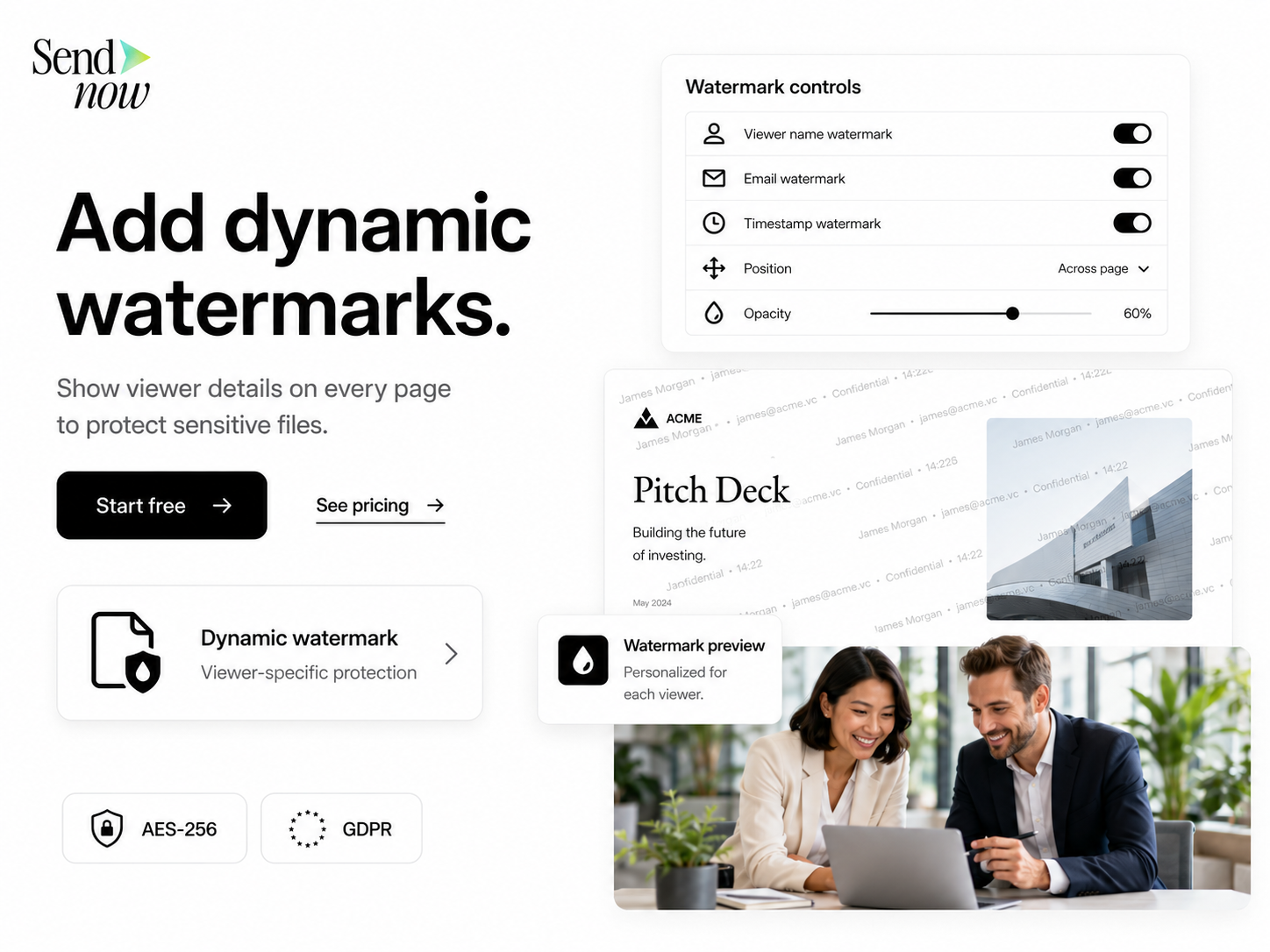
To be effective, the watermark must be legible but sufficiently transparent (e.g., 20% to 30% opacity) so as not to interfere with the readability of financial tables and text.
4. Combining Watermarking and Password Gates: The Dual-Layer Defense
The most secure workflow combines a password gate with dynamic watermarking, creating a dual-layer defense that secures both access and content.
+-------------------------------------------------------------+
|                     Dual-Layer Document Security            |
+-------------------------------------------------------------+
                              |
       +----------------------+----------------------+
       |                                             |
       v                                             v
+--------------+                             +---------------+
| Access Layer |                             | Content Layer |
| (Password &  |                             | (Dynamic      |
| Verification)|                             | Watermark)    |
+--------------+                             +---------------+
       |                                             |
       +----------------------+----------------------+
                              |
                              v
                       +--------------+
                       | Secure View  |
                       | (Browser)    |
                       +--------------+
The Access Layer: Password Gate and Verification
Before the document is loaded, the recipient must pass through the access gate. The system requires two verification steps:
- Password Verification: The recipient enters the unique, strong password assigned to the link.
- Email Verification: The recipient inputs their corporate email address and enters a one-time passcode sent to that address.
This ensures that the viewer has both the password and active access to the authorized email account, preventing unauthorized access if a link or password is shared.
The Content Layer: Dynamic Watermarking and View-Only Restrictions
Once the access gate is passed, the document is rendered in a secure, web-based viewer. The system applies the following controls:
- Dynamic Watermarking: The viewer's email and IP address are overlayed on every page.
- Download and Print Blocking: The secure viewer disables the browser's download, print, and save commands, ensuring the file remains within the secure platform.
- Screenshot Protection: The viewer implements technical controls to prevent standard screenshot tools from capturing the content.
5. Step-by-Step Configuration Guide on SendNow
Establishing a secure board pack sharing workflow is straightforward with SendNow. Follow this configuration guide:
Step 1: Upload the Board Pack
Compile your board pack into a high-quality PDF. Log in to your SendNow dashboard and upload the file to a secure directory (e.g., /Board_Packs/Q2_2026).
Step 2: Generate a Secure Sharing Link
Select the uploaded board pack and click Share. This opens the link configuration panel.
Step 3: Configure the Password Gate
- In the security settings, enable Password Protection.
- Enter a strong, randomly generated password.
- Communicate this password to the board members via an out-of-band channel, such as a phone call, secure messaging app, or during a pre-meeting briefing.
Step 4: Configure Email Verification and Expiration
- Enable Email Verification. Specify the allowed domains (e.g.,
company.com) or upload the specific email addresses of your board members. - Set a Link Expiry Date. For board packs, set the link to expire 48 hours after the scheduled board meeting.
Step 5: Apply the Dynamic Watermark
- Enable Dynamic Watermarking.
- Select the watermark template:
{viewer_email} | {ip} | {date}. - Adjust the text size, color, and set the opacity to 25% to ensure the content remains readable.
Step 6: Distribute the Link
Copy the secure link and share it with the board members via your corporate portal or secure email. The audit log will begin tracking activity as soon as the first recipient attempts to open the link.

6. Governance, Compliance, and Risk Management
Implementing these technical controls supports compliance with international data protection laws and corporate governance standards.
GDPR Compliance
Board packs frequently contain personal data, including executive compensation details, HR evaluations, and strategic plans that impact employees. GDPR Article 32 requires organizations to implement appropriate technical measures to secure this data. Combining a password gate with email verification and dynamic watermarking serves as strong evidence of compliance, demonstrating that the organization has taken reasonable steps to prevent unauthorized access.
DORA and Operational Resilience
For financial institutions in the EU, the Digital Operational Resilience Act (DORA) mandates strict controls over ICT systems and third-party data sharing. Secure board pack sharing pipelines reduce the risk of data exposure through external board portals, aligning with DORA's operational resilience requirements.
Corporate Governance Best Practices
Institutional investors and regulatory bodies expect boards to maintain a high standard of information security. Using an enterprise-grade sharing platform rather than consumer-grade file shares demonstrating a commitment to protecting shareholder value and corporate intelligence.
Related Reading
- Securing Confidential Board Packs for Finance Audits
- Best Practices for Distributing Encrypted Monthly Performance Packages
- Setting Up an Audit Trail for GDPR Compliant File Sharing
Frequently Asked Questions
What is a password gate and how does it protect board packs?
A password gate requires viewers to enter a unique password before they can access a shared link. This ensures that even if the link is forwarded or exposed, unauthorized users cannot view the content without the correct credentials.
How does dynamic watermarking prevent board pack sharing leaks?
Dynamic watermarking overlays the viewer's email address, IP address, and access timestamp on the document. This deters recipients from taking screenshots or photos of the screen, as any leak can be traced back to the specific viewer.
Can we customize the watermark text and opacity for board packs?
Yes. With SendNow, you can customize the watermark text to include variables like email, IP address, and date. You can also adjust the font size, angle, and opacity to ensure the document remains readable.
Is there an audit log of who accessed the password-gated board pack?
Yes. The platform maintains a complete audit log, recording the verified email address, IP address, device details, and the date and time of access for every viewer who unlocks the password gate.
How does this solution assist with GDPR compliance during sharing?
It provides the necessary technical controls—encryption, access gating, and tracking—to protect personal data contained within board packs. This helps organizations meet the security requirements of GDPR Article 32 and demonstrate accountability under Article 5(2).
Protect your corporate intelligence. Start your trial on SendNow and secure your board packs with password gates and dynamic watermarking today.