DocSend MCP: How to Connect It, What It Does and Where It Stops (2026)

DocSend has an MCP server at https://docsend.com/mcp that lets Claude, ChatGPT and Microsoft Copilot query and summarize your DocSend content. It is in open beta and available to Dropbox DocSend Advanced Data Rooms users only [Source: DocSend]. If you are on a lower DocSend plan, you cannot use it. SendNow's MCP server connects with one URL and an OAuth sign-in on any plan, and data rooms start at $19/month. The trade-off: DocSend's server reads and summarizes document content, while SendNow's manages and measures documents but never returns their text.
DocSend MCP: How to Connect It, What It Does and Where It Stops (2026)
What is the DocSend MCP server?
The DocSend MCP server is an official connector from Dropbox DocSend that lets an AI assistant work with your live DocSend documents and analytics through the Model Context Protocol. MCP is the open standard assistants use to call actions in other apps. If you are new to it, start with our guide to connecting Claude and ChatGPT to a data room with MCP.
DocSend describes four use cases: engagement intelligence, meeting preparation, workflow automation, and audit and security review. It is aimed at fundraising, M&A diligence and LP communications. Every request is permission-aware, meaning the assistant gets only the access the connected user already has [Source: DocSend].
Who can use the DocSend MCP server?
Only Advanced Data Rooms customers can use it today, and it is labelled open beta. That matters for two reasons.
First, plan cost. Advanced Data Rooms is DocSend's top tier, so the MCP server is effectively a premium add-on to a premium plan. Our DocSend pricing breakdown covers what the tiers cost and what each one locks.
Second, beta status. Features in open beta can change, break or be withdrawn. If a deal process depends on the connector, keep a manual fallback.
How do you connect DocSend MCP to Claude?
Add it as a custom connector, using the values DocSend publishes [Source: Dropbox Help]:
- In Claude, open Settings → Connectors.
- Click Add custom connector.
- Enter the name Dropbox DocSend and the MCP server URL
https://docsend.com/mcp. - Connect and sign in with your DocSend account.
How do you connect DocSend MCP to ChatGPT?
Use the same pattern in ChatGPT's connector settings: name Dropbox DocSend, MCP server URL https://docsend.com/mcp, and OAuth as the authentication method. Custom connector availability depends on your ChatGPT plan and, in a workspace, on your admin.

What can you do with DocSend MCP?
According to DocSend, you can query, summarize and act on live content from your assistant without downloading or re-uploading documents. Typical requests:
- "Who at Acme has opened the data room this week?" (engagement intelligence)
- "Summarize the key terms in the document before my call." (meeting preparation)
- "Flag any access that looks unusual." (audit and security review)
We could not retrieve DocSend's full announcement page when researching this article (it returned an access error), so we are not listing a tool count or tool names. DocSend has not published one in the sources we could read. Check DocSend's help center for the current list before you buy.
Where does DocSend MCP stop?
Three limits are worth knowing before you plan around it.
- Plan gate. No Advanced Data Rooms plan, no MCP.
- Beta. Expect change.
- It reads your content. Summarizing documents is a strength, and also the larger exposure. Anything an assistant can read can, in principle, be influenced by hidden text inside a file. Our MCP security checklist explains the risk and how to manage it.
How does SendNow MCP compare with DocSend MCP?
| SendNow MCP | DocSend MCP | |
|---|---|---|
| Status | Live | Open beta |
| Plan needed | Connect on any plan; data rooms from $19/mo | Advanced Data Rooms |
| Connect with | One URL + OAuth 2.1, no API key | Custom connector URL + OAuth |
| Works in | Claude, ChatGPT, any remote MCP client | Claude, ChatGPT, Copilot |
| Tools | 24, published by name | Not published in sources reviewed |
| Reads document text | No, by design | Yes, summarizes content |
| Creates and edits rooms by prompt | Yes (create_microsite, update_microsite) | Not stated in sources reviewed |
| Changes link security by prompt | Yes (update_link_security, revoke_link) | Not stated in sources reviewed |
Checked October 5, 2026. Sources: DocSend, Dropbox Help, SendNow AI page.
The honest read: DocSend's server is built to ask questions about documents and engagement. SendNow's is built to operate the room: upload files, set NDA and download rules, create links, revoke them and read viewer analytics. If you want a summary of clause 14, DocSend's approach does that and SendNow's does not. If you want to stand up a gated data room in one prompt on a startup budget, SendNow does that and you do not need a top-tier plan.
For the wider switch, see best DocSend alternatives and SendNow vs DocSend.
What can SendNow's MCP server do that you can try today?
Connect Claude or ChatGPT to https://share.sendnow.live/mcp, sign in, and ask:
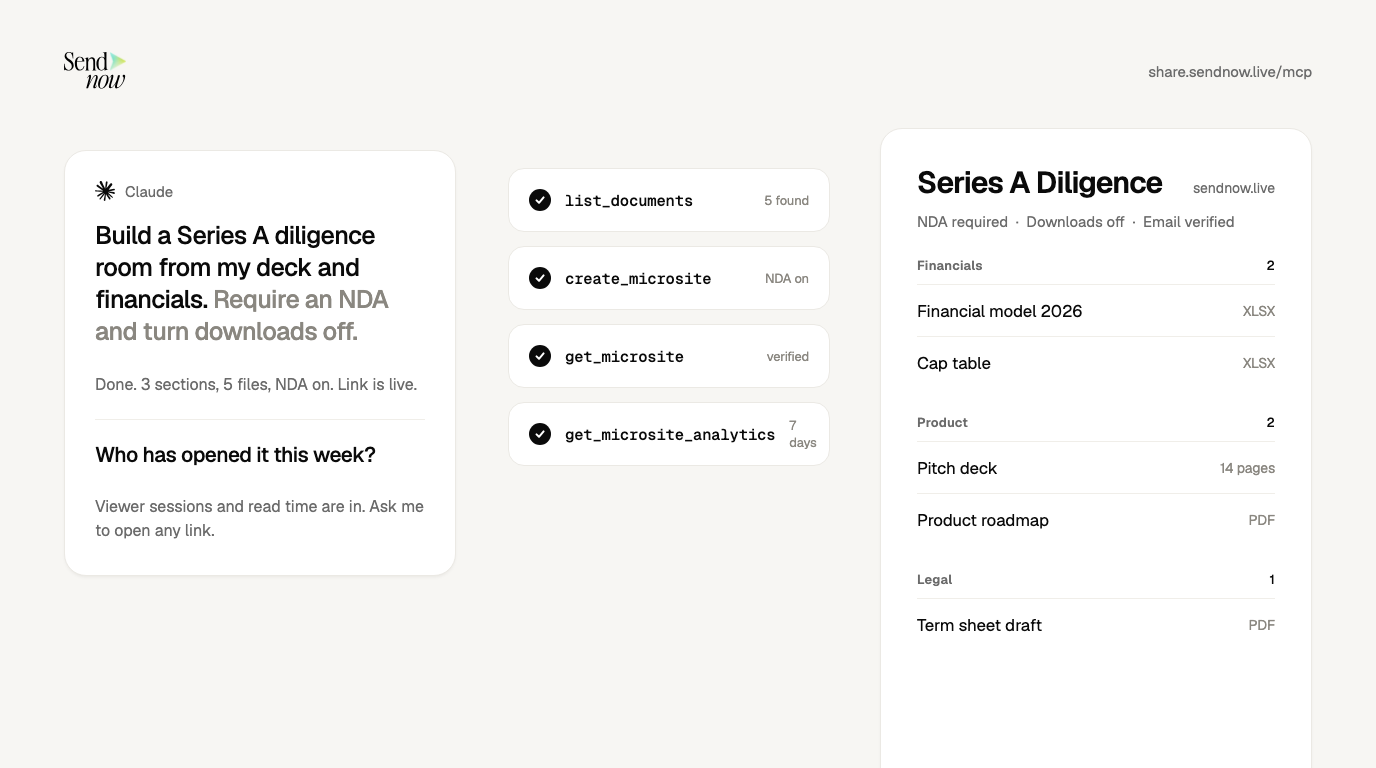
"Create a data room called Series A Diligence with my deck and financials, require an NDA, turn downloads off, then show me the settings."

The assistant calls list_documents, create_microsite and get_microsite. Then:
"Who opened it this week, and how long did they spend?"
That calls get_microsite_analytics and list_link_viewers. The full tool list and plan limits are on the AI and MCP page. Security controls behind it are on the NDA gate, dynamic watermark and screenshot blocking pages.
Which should you choose?
| Your situation | Recommendation |
|---|---|
| Already on DocSend Advanced Data Rooms and want AI summaries of documents | Try DocSend MCP in beta, keep a manual fallback |
| Founder or small deal team that needs a gated room and tracking, not a top-tier plan | SendNow: data rooms from $19/mo, MCP on any plan |
| Need the assistant to read and quote document text | DocSend MCP, with the security caveats above |
| Want link and room controls changeable by prompt | SendNow MCP |
Does DocSend have an MCP server?
Yes. It is at https://docsend.com/mcp, in open beta, for Advanced Data Rooms customers.
Can ChatGPT connect to DocSend?
Yes, through a custom connector with the DocSend MCP URL and OAuth, subject to your ChatGPT plan and workspace settings.
Is DocSend MCP free?
DocSend does not sell it separately in the sources we reviewed. It requires the Advanced Data Rooms plan, which is a paid tier.
Is there a cheaper alternative to DocSend MCP?
SendNow's MCP server works on any plan, and creating data rooms needs a plan that includes them, starting at $19/month. See pricing.
Sources
About the Author: Rifana Hameem
Rifana is the founder of SendNow. She leads the team in building secure, compliant, and analytics-rich document sharing tools for finance and professional teams worldwide.
Connect on LinkedIn