How to Connect Claude and ChatGPT to a Data Room with MCP (2026 Guide)

You connect Claude or ChatGPT to a data room through MCP, the Model Context Protocol. With SendNow that takes one URL (https://share.sendnow.live/mcp) and an OAuth sign-in: no API key, no config file. Your assistant then gets 24 tools to upload files, build a data room, set NDA and download rules, revoke links and read viewer analytics. Data rooms start at $19/month. Papermark's MCP needs a Business plan and local setup, and DocSend's is in beta for Advanced Data Rooms. Setup, security model and limits are below.
How to Connect Claude and ChatGPT to a Data Room with MCP (2026 Guide)
What does it mean to connect AI to a data room?
Connecting AI to a data room means giving an assistant such as Claude or ChatGPT permission to operate your data room for you, through a standard interface called MCP. Instead of clicking through a dashboard to create a room, set an NDA and check who opened the term sheet, you say it in a sentence and the assistant does it.
Three terms are enough to follow the rest of this guide:
- MCP client: the AI app you talk to (Claude, ChatGPT, or another assistant that supports MCP).
- MCP server: the service that exposes actions to the client. SendNow's runs at
share.sendnow.live/mcp. - Tool: one action the server offers, such as
create_micrositeorget_document_analytics. The assistant picks the tool, fills in its parameters from your request, and reads the result back to you.
Why bother? Data room work is mostly small administrative decisions repeated many times: which folder, which link settings, who gets access, who has opened what. SendNow's own research across more than 10 million document views found the average reader spends about 2 minutes 30 seconds on a document [Source: State of Document Engagement 2026]. When attention is that short, the time between "someone opened it" and "you followed up" matters, and a question typed into a chat is faster than a dashboard visit.
How does MCP work between an AI assistant and a data room?
MCP is an open standard that lets an AI assistant call actions in another app through a server. For a data room, the flow has five steps:
- Connect. You add the server URL in your assistant's connector settings and sign in with OAuth 2.1.
- Discover. The assistant asks the server which tools exist and what parameters each takes.
- Request. You ask for something in plain language.
- Call. The assistant chooses a tool and sends parameters, for example
requireNda: true. - Execute. The server runs the action inside your account, under your permissions, and returns the result.
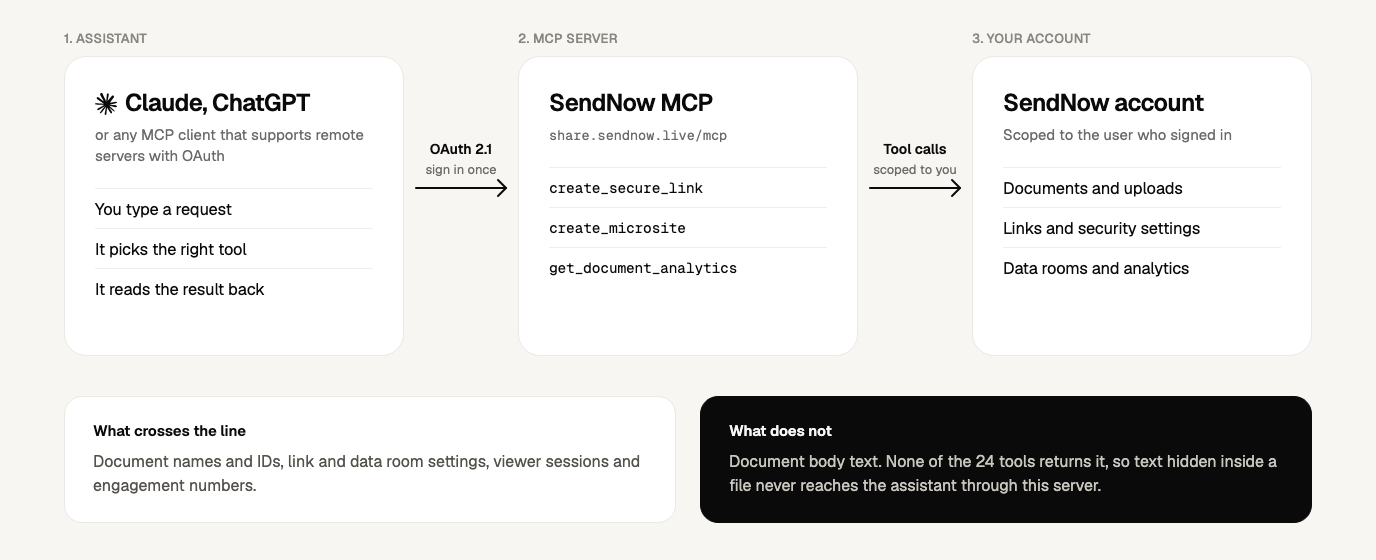
Figure 1. A request travels from the assistant to the MCP server and into your account. Document body text is not part of any response.
The detail that matters most when comparing data room MCP servers is local versus remote. A local server runs on your computer, usually started from a JSON config file with an API token pasted in. A remote server runs on the vendor's infrastructure and you authorize it with OAuth, the same sign-in pattern as "Continue with Google". Claude's custom connectors are built for the remote kind: Claude connects to the server from Anthropic's cloud, which is why the server must be reachable on the public internet [Source: Anthropic, custom connectors using remote MCP].
For a deal team, remote has three practical consequences. There is no secret sitting in a config file on a laptop. Nothing is installed to maintain. And access can be removed from the assistant's connector settings without touching the data room itself.
What can an AI assistant do inside a SendNow data room?
The SendNow MCP server exposes 24 tools in five groups. This is the full list as of October 2026:
| Group | Tools | What the assistant can do |
|---|---|---|
| Documents (9) | list_documents, get_document, upload_document_direct, request_document_upload, check_document_upload, start_document_upload, finish_document_upload, update_document, delete_document | Search your library, read file details, upload a file you attach in chat, hand you a one-time upload link for large files, rename, delete |
| Sharing links (5) | create_secure_link, list_links, update_link_security, revoke_link, delete_link | Create a tracked link with email verification, NDA, passcode, expiry, view cap, watermark; tighten or switch it off later |
| Data rooms (5) | create_microsite, list_microsites, get_microsite, update_microsite, delete_microsite | Build a branded multi-document room with sections, folder-level gating and call-to-action buttons; edit or remove it |
| Analytics (3) | get_document_analytics, list_link_viewers, get_microsite_analytics | Views, unique and repeat viewers, reading time, completion, downloads, NDA signatures, per-viewer sessions |
| Account (2) | get_account_profile, get_account_usage | Plan, storage, counts and limits |
Two things are worth knowing before you rely on it. First, some settings are plan-gated: NDA gates and screenshot blocking need Pro or above, and allowed-viewer lists and dynamic watermarks need Business. The assistant tells you when a setting is not available on your plan instead of silently skipping it. Second, data rooms (SendNow calls them microsites) are sold on the Microsite plans, which start at $19/month. You can connect the assistant on any plan, but creating a room needs a plan that includes them.
How do you connect Claude to SendNow?
Claude connects to SendNow as a custom connector. It takes about two minutes:
- In Claude, open Settings → Connectors.
- Click Add custom connector.
- Name it SendNow and paste
https://share.sendnow.live/mcp. - Click Connect, sign in to SendNow, and click Allow access.
- Start a chat and ask: "What is my SendNow plan and how much storage am I using?"
Step 5 is your test. It calls get_account_profile, a read-only tool, so you confirm the connection works before you ask the assistant to change anything. SendNow is under review for Claude's Connectors Directory; once it is listed you will be able to add it in one click from there. The AI and MCP page has the setup video.
How do you connect ChatGPT to SendNow?
SendNow is under review for the ChatGPT app directory. Once approved, you will find it under Apps in ChatGPT, click Connect, sign in to SendNow, and allow access.
Until then, ChatGPT can reach any remote MCP server through a custom connector if your plan and workspace settings allow it. The values are the same ones you used for Claude: a name (SendNow), the server URL https://share.sendnow.live/mcp, and OAuth as the authentication method. Custom connector availability depends on your ChatGPT plan and, in workspaces, on your admin, so check OpenAI's help center for the current menu path. DocSend documents the same pattern for its own beta server [Source: Dropbox Help, connect the DocSend MCP server].
How do you build a data room with one prompt?
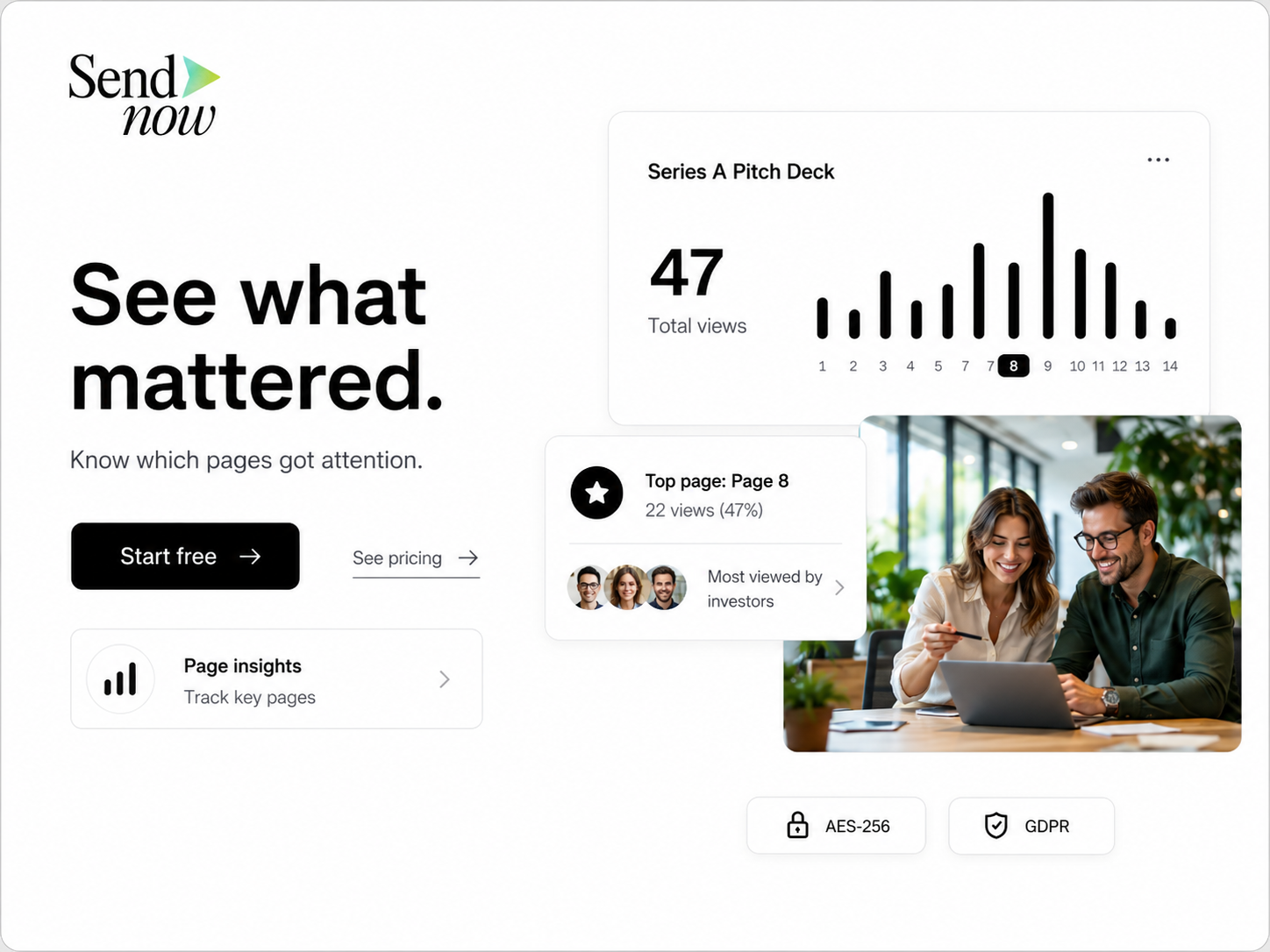
Give the assistant the structure, the files and the rules in one message. A prompt that works well:
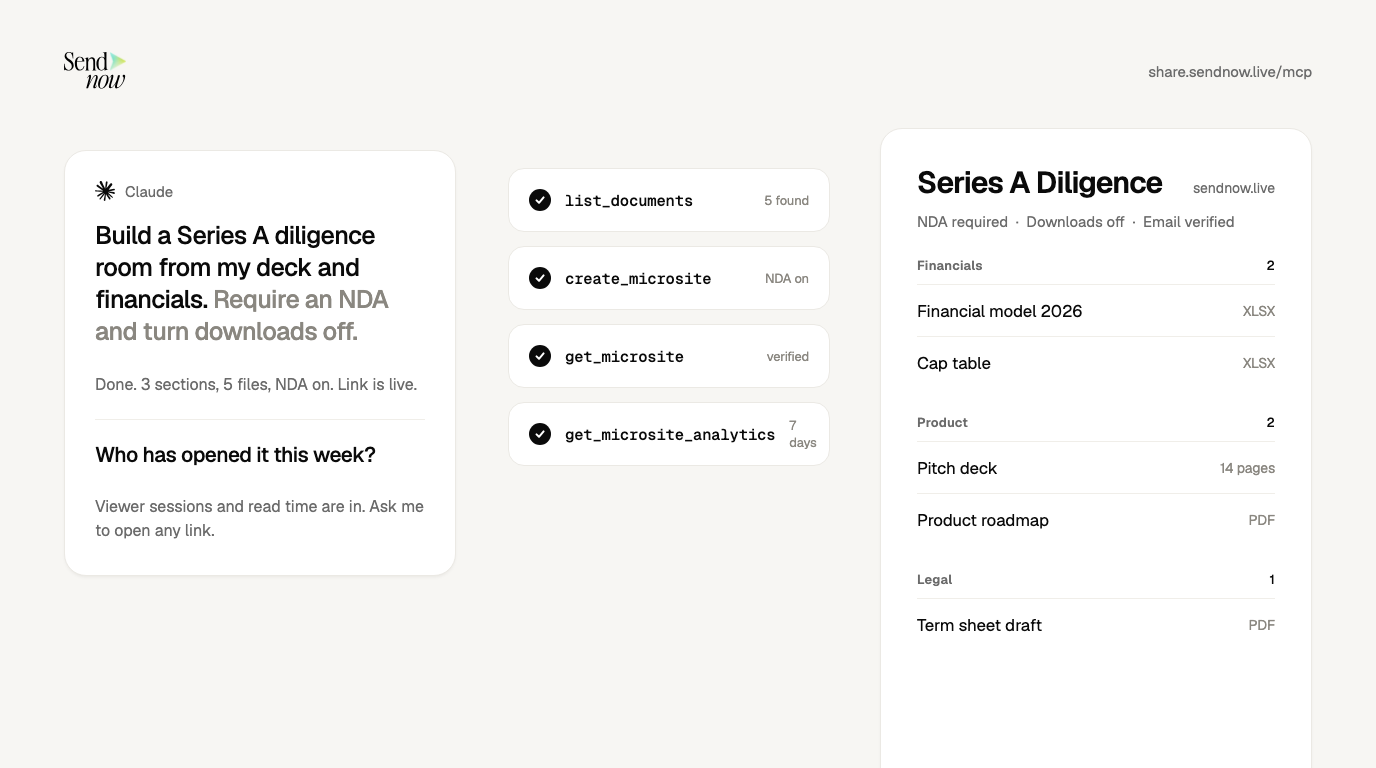
"Create a data room called Series A Diligence. Put my financial model and cap table in a Financials section, my pitch deck and roadmap in Product, and the draft term sheet in Legal. Require email verification and an NDA, turn downloads off, and expire it on December 31. Then read the settings back to me."
Behind that sentence, the assistant makes three calls:
| Step | Tool | What it does |
|---|---|---|
| 1 | list_documents | Finds your five files by name and gets their IDs |
| 2 | create_microsite | Creates the room: three section items with file items under them, requireEmail, requireNda, disableDownload, expiresAt |
| 3 | get_microsite | Reads the saved room back so you can check every setting against what you asked for |
Four habits make this reliable.
Name the exact files. "My deck" is ambiguous if you have three versions. The assistant will ask, but you save a round trip by being specific.
Attach files in the chat. If a document is not yet in SendNow, attach it and the assistant uploads it with upload_document_direct. For files too large to pass through the chat, it gives you a one-time browser upload link instead and checks completion with check_document_upload.
Supply your own NDA wording. The ndaText parameter takes any text. Paste counsel-approved language rather than letting the assistant draft legal terms.
Start restrictive, then loosen. Ask for downloads off and email verification on for the first version. Widening access is a one-line follow-up; discovering a document was downloadable after the fact is not recoverable.
For the full set of room controls, including folder-level gating, see the NDA gate, dynamic watermark and screenshot blocking pages.
How do you control who sees what when an AI is involved?
Security for an AI-operated data room has two layers: what the assistant itself can reach, and what each viewer can do once a link exists. The controls below apply at both.
| Layer | Control | How it is set |
|---|---|---|
| Assistant access | OAuth 2.1 sign-in, scoped to your own account | You approve it once; remove it in your assistant's connector settings and the tokens are deleted |
| Assistant actions | Confirmation before deleting | The assistant names the exact file or link and waits for a yes |
| Link | Email verification, passcode, expiry date, view cap, download block | create_secure_link, update_link_security |
| Link (paid tiers) | NDA gate, screenshot blocking; allowed-viewer lists and dynamic watermark on Business | Same tools, plan-gated |
| Room section | Gate a single folder with its own passcode, email check or NDA | folderGating on each section in create_microsite |
| After the fact | Switch a link off while keeping its history | revoke_link |
Three risks come up in every conversation about connecting AI to confidential files, and each has a concrete answer here.
Risk 1: an over-permissioned assistant. CData's security guidance notes that ChatGPT and Claude will connect to almost any MCP server you give them and neither vendor vets what is on the other end [Source: CData, Secure Data in AI]. So the first control is yours: connect only servers you trust, and prefer OAuth over pasted tokens so access is tied to a named user and revocable.
Risk 2: prompt injection through document content. If an assistant reads a file that contains hidden instructions, it may follow them. The SendNow server narrows this by design: none of the 24 tools returns document body text. The assistant sees names, IDs, settings and analytics, not what is written inside your PDFs. That also means the connector cannot summarize or quote your documents today; it manages and measures them. For a data room holding financials and contracts, that is a trade worth knowing about.
Risk 3: a mistaken destructive action. Deletion is permanent. If you only want someone to lose access, say "revoke the link" rather than "delete it". Revocation keeps the view history for your records. The assistant confirms the exact target before any delete either way.
SendNow also does not allow document contents to be used to train AI models through this integration. Read the Security page and the Privacy Policy for the full terms.
How do you track engagement from the chat?
Three analytics tools cover documents, links and rooms:
get_document_analyticsreturns total views, unique and repeat viewers, average reading time, completion rate, downloads and NDA signatures for a document across all its links.list_link_viewersreturns the session list for one link: verified email, location, device, time spent, completion percentage, whether they downloaded, and whether they signed the NDA.get_microsite_analyticsreturns visitors, repeat visitors, viewing time and session logs for a whole room.
Useful prompts:
"Who opened the Series A room this week, and which of them came back more than once?" "For the link I sent to Acme, how far did they get and did they sign the NDA?" "Rank everyone who viewed my deck by time spent."
Ask for verified-email sessions first. Those are named people. Anonymous opens can include link previews and mail scanners, a known problem with attachment tracking generally, and the verified list is the clean place to start a follow-up. For the underlying metrics, see document analytics. If you want events pushed to your CRM rather than asked for, webhooks do that.
One caution: an assistant summarizing numbers can slip. Before you quote a read-time or a count to an investor, open the dashboard and check it.
How does SendNow's MCP compare with Papermark, DocSend and Datasite?
Several data room vendors now ship MCP servers, so "first" is a crowded claim. Papermark announced its server in July 2026, DocSend has one in open beta, and Datasite and Ideals also offer MCP integrations. The differences that matter in practice are how you connect and what plan you need.

| SendNow | Papermark | DocSend | |
|---|---|---|---|
| Connection | Remote URL + OAuth 2.1, no API key | Local JSON config in Claude Desktop with an API token | Custom connector URL + OAuth |
| Plan needed | Any plan to connect; data rooms from $19/mo | Business plan and above; Data Rooms €99/mo | Advanced Data Rooms, open beta |
| Tools | 24 | 43 | Not published in the sources reviewed |
| Works in | Claude, ChatGPT, other remote MCP clients | Claude Desktop, Cursor and other local clients | Claude, ChatGPT, Copilot |
Checked October 5, 2026. Sources: Papermark MCP server, Papermark: create a data room with Claude, DocSend: MCP for DocSend. Vendors change plans often; confirm before you buy.
Papermark exposes nearly twice as many tools and has a CLI and API, which is a real advantage if you script bulk operations. SendNow's case is access: you connect with a URL and a sign-in, on a plan priced for founders rather than enterprise deal teams. For a broader view of the category, see best virtual data room providers, SendNow vs Papermark and SendNow vs DocSend.
Where does the Chrome extension fit?
The MCP connector is for operating rooms and reading analytics from a chat. The SendNow Chrome extension is for the quick one-off: turn a PDF or pitch deck into a secure, trackable link from your browser. Per its store listing, you upload the file, get a link, share it anywhere, and watch real-time analytics. The same controls apply: password protection, email verification, link expiry, NDA gates, dynamic watermarks and download or screenshot protection.
A common pattern: use the extension for a single deck going to a single investor, and the AI connector when you are assembling a multi-folder room or asking questions across many links.
What are the limits of connecting AI to a data room?
Be clear-eyed about five limits before you build a workflow on this.
- The assistant does not read your documents. No tool returns body text, so it cannot answer "what does clause 14 say". It manages and measures files.
- ChatGPT is not yet in the app directory. Claude and ChatGPT both connect through custom connectors today; one-click directory listings are in review.
- Plan gates apply. Some security settings need Pro or Business. The assistant will say so.
- Numbers need a check. Verify analytics in the dashboard before you cite them.
- Deletion is permanent. Prefer revoking.
Which setup fits your deal?
| Your situation | Recommendation |
|---|---|
| Founder raising a seed or Series A who wants a gated room fast | SendNow with Claude or ChatGPT: one URL, NDA and download rules in a single prompt |
| Sell-side advisor staging disclosure across buyers | A data room with folder-level gating, driven by prompt; keep NDA text from counsel |
| Sales team tracking proposals | The Chrome extension for single links, the connector for "who opened what" questions |
| Developer who wants to script hundreds of rooms | Papermark's 43-tool server and CLI, if the Business plan fits your budget |
| Large corporate M&A with procurement and audit requirements | An enterprise VDR such as Datasite |
Is it safe to connect ChatGPT or Claude to a data room?
It can be, with the right design. Use OAuth rather than pasted tokens, connect only servers you trust, keep destructive actions behind confirmation, and choose a server whose tools do not return document text. SendNow's server meets those four tests. Treat everything else as a normal access-control exercise: least privilege, expiry dates, NDA gates, and revocation when a deal closes.
Do I need a paid SendNow plan to use the MCP connector?
No. You can connect on any plan. Creating data rooms needs a plan that includes them (Microsite plans start at $19/month), and some security settings need Pro or Business. The assistant tells you when a setting is unavailable.
Can the AI see the contents of my documents?
No. The assistant sees document names, details, links, settings and viewer analytics. None of the 24 tools returns what is written inside a file.
Does SendNow work with other MCP clients?
Yes. Any MCP client that supports remote servers with OAuth can connect to https://share.sendnow.live/mcp. Claude and ChatGPT are the two documented in the setup guide.
How do I disconnect the AI from my account?
Remove SendNow from your assistant's connectors or apps settings. Your access tokens are deleted. You can also email contact@sendnow.live.
Start with one room
The fastest way to judge this is to run it once. Connect SendNow to Claude or ChatGPT, ask for your plan and storage as a read-only test, then build a small room with downloads off and an NDA on. If it saves you ten minutes of clicking, you will know where it fits.
Where to go next
- Setup and prompts: AI due diligence data room: 15 prompts for Claude and ChatGPT
- Sharing a single file: How to share a document from ChatGPT with a link you can track
- Security: Is MCP safe for confidential documents? A practical checklist
- Comparisons: Papermark MCP vs SendNow MCP and DocSend MCP: setup, limits and alternatives
- Browser tool: How to track if someone opened your PDF with a Chrome extension
- By use case: startup fundraising, small M&A deals, commercial real estate and consultants and agencies
- Free tools: data room prompt generator and MCP server security checklist
- Compare vendors: data room MCP servers compared
Sources
- Anthropic, Get started with custom connectors using remote MCP
- Model Context Protocol, Connect to remote MCP servers
- Papermark, The Papermark MCP Server and How to Create a Data Room with Claude
- DocSend, MCP for DocSend and Dropbox Help, Connect the DocSend MCP server
- Datasite, Datasite MCP server launch
- CData, Secure Data in AI: ChatGPT and Claude Access
- SendNow, State of Document Engagement 2026
About the Author: Rifana Hameem
Rifana is the founder of SendNow. She leads the team in building secure, compliant, and analytics-rich document sharing tools for finance and professional teams worldwide.
Connect on LinkedIn