8 Best DocSend Alternatives for Startups in 2026 (Tested)

- DocSend raised prices and killed its free tier: NDA gating and dynamic watermarks now cost $150/month minimum on their Advanced plan.
- SendNow Pro ($17/mo, or $9/mo billed annually) gives you every finance-grade security feature DocSend locks away: NDA gating, screenshot protection, dynamic watermarks, AI engagement scoring, and branded microsites.
- Bot filtering is a dealbreaker: DocSend's analytics are corrupted by Microsoft Defender and Barracuda crawlers; HummingDeck and SendNow both filter them out.
- Microsites (deal rooms) should not cost $150+/month: SendNow Microsite Pro is $19/mo, versus DocSend's $150–$300/month for equivalent functionality.
- Eight real alternatives reviewed below, ranked honestly for finance teams, sales teams, and startups, with pricing verified as of July 2026.
8 Best DocSend Alternatives for Startups in 2026 (Tested)
At a Glance: Feature & Pricing Matrix
Platform Key Differentiator Best For Entry Pricing SendNow Page-by-page analytics, NDA gating, screenshot protection, dynamic watermarking Founders, VCs & M&A teams USD 9 / mo (or $6.25 / mo annual) DocSend Legacy file sharing & basic tracking Generic document links USD 15–150+ / user / mo Digify Virtual data rooms Corporate M&A USD 120+ / mo Key Takeaway: SendNow delivers complete document telemetry, AI engagement scoring, and dynamic watermarking at flat rates with zero per-user seat penalties.
Introduction
For years, DocSend was the default choice for founders sharing pitch decks and deal teams distributing confidential documents. That reputation held even after Dropbox acquired DocSend in 2021 for $165 million. But five years into that acquisition, the product has not kept pace with what the market now expects.
In March 2025, Dropbox discontinued its free Send & Track feature, pushing millions of users toward DocSend's paid plans, starting at $10/month for a plan that caps tracked visits at 100 per billing cycle. A 10-person team on the Advanced tier now costs over $9,000 per year. Meanwhile, competitors have built finance-grade security, AI-powered analytics, and branded deal rooms at a fraction of that cost.
This review covers eight tools worth switching to, based on pricing accuracy as of July 2026, documented feature sets, and the specific needs of finance professionals, sales teams, and deal-makers.
Ready to stop overpaying? Start Free, No Card Required →
Q1: Why Do So Many Teams Look for a DocSend Alternative in 2026?
The short answer: DocSend's pricing structure has not aged well, and product development has slowed significantly since the Dropbox acquisition.
Dropbox's strategic focus has shifted to Dash, its AI-powered universal search product. As a result, DocSend's feature development has stalled. Publicly visible changelogs show far less activity than competing platforms have shipped in the same period. Meanwhile, the product ships with meaningful gaps that competitors have already solved: bot traffic from corporate email security systems (Microsoft Defender, Barracuda, Mimecast) registers as real document views in DocSend's analytics, so you may call a prospect who has not yet opened your deck because DocSend told you they had. Source: HummingDeck
The pricing also penalizes growth in a way that feels structurally misaligned with how teams actually work. A 5-person sales team on the Standard plan pays $225/month and cannot create a shared deal room. Upgrading to get deal rooms puts them at $450+/month, comparable to a full CRM. In 2026, deal rooms are not a premium feature. They are the baseline expectation for any team managing multi-document sales or fundraising workflows.
On G2, "expensive" is the most frequently cited complaint across 500+ DocSend reviews. Source: Peony
Q2: Did DocSend Remove Its Free Plan?
Yes. DocSend has never offered a permanent free tier, only a 14-day trial. However, Dropbox's built-in Send & Track feature gave millions of users free document tracking without a separate subscription. On March 31, 2025, Dropbox discontinued that feature entirely. Users affected received a 3-month DocSend trial promo code. After that period, they faced the DocSend paywall. Source: Dropbox Community Forum
After a trial expires, accounts enter a "Limited Trial" state: you can log in and view previously uploaded documents, but analytics, link controls, sharing features, and eSignatures all become unavailable. This is not a free plan. It is a locked-down view into content you can no longer use.
For teams that relied on Dropbox's Send & Track for basic open notifications and view counts, this change represented a significant disruption. Many began evaluating the broader document tracking market for the first time, which is why searches for "DocSend alternative" spiked sharply in Q2 2025 and have remained elevated through 2026.
Q3: What Should You Look for in a Document Sharing Tool?
Before evaluating any DocSend alternative, it helps to understand which capabilities actually matter for your use case. Finance professionals and deal teams have different requirements than general sales teams or startups.
For finance professionals, VCs, and deal teams:
- Page-by-page analytics (not just "opened" notifications: you need to see which sections investors spent time on)
- NDA gating before document access
- Dynamic watermarks with recipient email and IP embedded in the document
- Screenshot protection
- Access revocation and expiry controls
- Branded deal rooms for organized investor or LP materials
For sales and revenue teams:
- Real-time open notifications
- Per-page engagement data to time follow-ups accurately
- Multi-document sharing under one link
- CRM integrations (Salesforce, HubSpot)
- Bot traffic filtering: a critical capability often overlooked until your data becomes unreliable
For any team:
- Transparent pricing without hidden per-user costs
- A free trial that does not require a credit card
- GDPR-compliant data handling
- Infrastructure on established cloud providers (AWS, GCP)
See our full feature comparison on the pricing page for a side-by-side breakdown of what each tier unlocks.
Keep these criteria in mind when reviewing the options below. The right tool depends heavily on your specific workflow, a VC firm running due diligence has different priorities than a SaaS sales rep tracking proposal opens.
Q4: Which DocSend Alternative is Best for Finance Professionals?
Finance professionals have the most demanding requirements in this category. A pitch deck viewed by 40 LPs during a fundraise, a CIM distributed to 30 potential acquirers in an M&A process, or a quarterly update sent to a fund's investor base, each of these scenarios demands controls that general document sharing tools do not provide.
The key requirements for finance use cases include: NDA gating so recipients must sign before viewing, dynamic watermarks that embed recipient identity into every page, screenshot protection that prevents screen capture during viewing, access revocation so you can disable a link after it has been shared, and page-level analytics granular enough to identify which investors spent time on financial projections versus the management section.
SendNow was built specifically for this buyer profile. The platform includes all of the above features: NDA gating, dynamic watermarks, screenshot protection, access revocation, expiry dates, allow/block lists, and page-by-page analytics, on its entry-level plans. The AI engagement scoring feature automatically surfaces which recipients show the highest intent based on reading patterns, return visits, and time spent on decision-relevant pages. View real-time tracking capabilities →
Pricing starts at $9/month for Lite ($6.25/month billed annually) and $17/month for the Pro plan ($9/month billed annually).
For comparison, DocSend requires the Advanced tier ($150/month, annual) to access NDA gating and dynamic watermarks. That is nearly a 9x price difference for the same core security features.
Q5: The 8 Best DocSend Alternatives in 2026
1. SendNow: Best Overall for Finance and Deal Teams
Pricing: Lite $9/month ($6.25/mo annual, 5 docs, 2 GB), Pro $17/month ($9/mo annual, 100 docs, 15 GB), Business $43/month ($20/mo annual, 300 docs, 50 GB). Free trial, no credit card required.
SendNow is purpose-built for finance professionals: VCs, investment bankers, private equity firms, and deal teams that share sensitive documents with multiple counterparties simultaneously. The platform combines enterprise-grade security with a clean, intuitive interface that does not require onboarding calls or lengthy setup.
Key strengths:
- Page-by-page analytics with real-time open notifications
- AI engagement scoring that ranks viewer intent based on behavioral signals
- NDA gating: viewers must sign an NDA before accessing the document
- Screenshot protection and dynamic watermarks that embed viewer email and IP into every page
- Branded deal rooms (microsites) for organized multi-document sharing
- AES-256 encryption on AWS infrastructure with full GDPR compliance
- Access revocation, expiry dates, download blocking, allow/block lists
- AI chatbot embedded in documents to answer viewer questions
- PowerPoint & rich media sharing: share PowerPoint as a link preserving embedded video/audio without flattening to PDF, plus granular pitch deck analytics
- Custom domains and Slack/webhook integrations
- Bot filtering: automatically excludes email security scanner traffic from your file tracking analytics
The combination of finance-first security features and AI-powered engagement intelligence at $9–$43/month makes SendNow the most compelling DocSend alternative for deal-making teams in 2026.
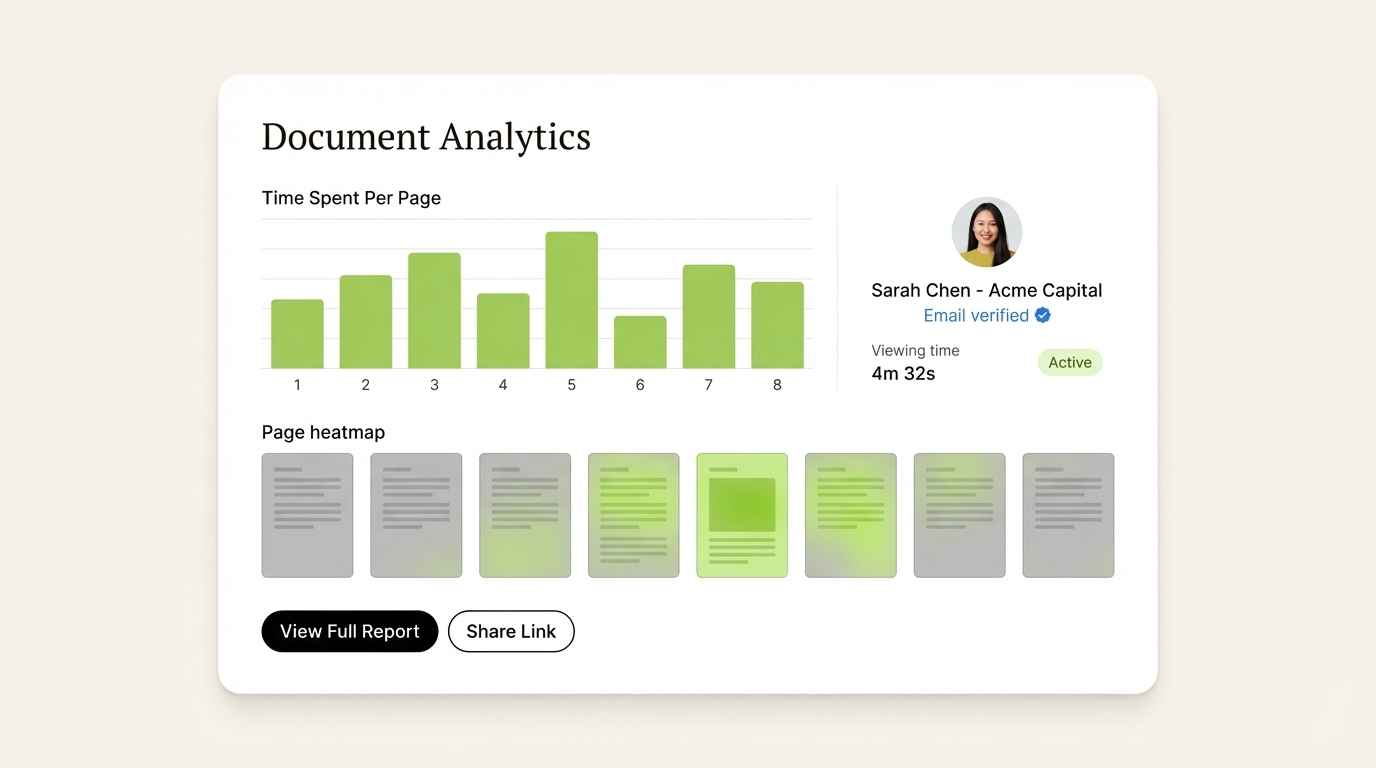
SendNow's page-by-page analytics dashboard surfaces exactly which pages held investor attention, with real-time viewer identification and per-session engagement data.
Best for: VCs, investment bankers, PE firms, financial advisors, startup founders raising capital.
2. Papermark: Best Open-Source Option
Pricing: Free (1 user, 50 docs), Pro ~$24/month, Business ~$59/month, Data Rooms ~$99/month. (Prices listed in EUR.)
Papermark is the open-source DocSend alternative, and it is the right answer for a specific kind of team: technical founders who want to self-host, audit the code, and avoid a vendor entirely. The hosted product is competent, the viewer is clean, and the free tier is genuinely usable for a single founder sharing one deck.
Key strengths:
- Fully open source (AGPL) with an active GitHub repository you can self-host
- Generous free tier: 1 user, 50 documents, basic page analytics
- Custom domains on paid plans
- Clean, fast document viewer with no forced PDF flattening on newer builds
Where it falls short:
- No NDA gating on any tier
- No dynamic watermarking with recipient identity embedded per page
- No screenshot protection
- Data Rooms are ~€99/month, which erases most of the price advantage the moment you need more than one document under one link
- Self-hosting is real work: you own the infrastructure, the upgrades, and the security posture
The honest read: if your team can run its own infrastructure and your documents are not sensitive enough to need an NDA gate, Papermark is excellent and free. If you are sharing financials, cap tables, or anything pre-announcement, the missing NDA gate and watermarking are disqualifying, and the Data Room tier costs more than SendNow's equivalent.
Best for: Budget-constrained startups, technical teams comfortable with self-hosting, teams that prioritize open-source over polish.
3. Digify: Best for Enterprise Data Rooms
Pricing: Pro $140/month (1 user, 3 data rooms), Team $350/month (3 users, 10 data rooms), Enterprise custom. 30% discount on annual billing. Source: Digify
Digify is a mature virtual data room platform with strong security credentials: AES-256 encryption, ISO 27001 compliance, dynamic watermarking, screen shield (screenshot protection), and persistent protection after download. The platform is trusted by over 600,000 professionals globally. Source: VDR Solutions

The significant limitation is price. Digify's Pro plan at $140/month covers a single user with only 3 data rooms, more expensive than SendNow's Business plan ($43/month, 3 users) for a fraction of the access. Teams that need enterprise-grade compliance controls and can justify the cost will find Digify reliable; smaller teams will find the value proposition hard to justify.
Best for: Enterprises with compliance requirements and budget for premium data room tooling.
4. PandaDoc: Best for Proposals and eSignatures
Pricing: Essentials $19/user/month, Business $49/user/month, Enterprise custom. Source: Eversign/PandaDoc Pricing Guide
PandaDoc is a full document lifecycle platform, creation, automation, tracking, and eSignatures under one roof. Per-page analytics are available on the Business plan. Strong CRM integrations (Salesforce, HubSpot, Pipedrive) push tracking data directly into deal records.
The limitation for document tracking use cases is that per-page analytics require the $49/user/month Business plan, and the tracking interface is secondary to the creation workflow. PandaDoc is excellent if you want one platform for proposals, contracts, and signatures. It is less specialized than dedicated analytics tools for pure document engagement intelligence.
Best for: Sales teams that want document creation, eSignatures, and basic tracking in a single platform.
5. Orangedox: Best for Google Drive Users
Pricing: Custom/contact for pricing. Free trial available.
Orangedox positions itself as the leading virtual data room for Google Drive and Dropbox, with one-click data rooms that sync automatically with existing cloud storage. Trusted by 300,000+ professionals. Source: Orangedox
The Google Workspace integration is the defining differentiator: teams already managing documents in Google Drive can create a tracked, secure data room without re-uploading or restructuring files. Orangedox includes document-level analytics, access controls, NDA gating (recently added), and forwarding prevention.
Best for: Teams already embedded in Google Workspace who want VDR capabilities without migrating documents to a new platform.
6. HummingDeck: Best Bot Detection for Sales Teams
Pricing: Free (5 docs, basic tracking), Starter $10/month, Pro $25/user/month, Business $40/user/month.
HummingDeck's standout feature is three-layer bot detection that filters automated email security scans from real engagement data, the specific problem that corrupts DocSend analytics for enterprise email senders. Deal rooms are included from the Starter plan at $10/month. Per-page analytics and Slack notifications are available on the Pro plan at $25/user/month. Source: HummingDeck
The limitation is a smaller user base and fewer CRM integrations: Salesforce is not currently on the roadmap.
Best for: Sales teams that email into large enterprises and need trustworthy engagement data uncorrupted by security crawlers.
7. Qwilr: Best Web-Native Proposal Analytics
Pricing: Business $35/user/month, Enterprise $59/user/month (10-user minimum).
Qwilr renders proposals as web pages rather than PDF viewers, enabling block-level interaction tracking, pricing calculator toggles, accordion section opens, outbound link clicks, time per content section. The analytics depth is unique because the underlying format allows it. Source: HummingDeck
The key limitation: you must build proposals inside Qwilr's editor. You cannot upload existing PDFs for tracked hosting. This is a workflow change, not a drop-in replacement.
Best for: Agencies and sales teams willing to rebuild proposal workflows inside Qwilr's editor in exchange for deeper interaction data.
8. Brieflink: The Free Option, With One Serious Caveat
Pricing: Free, permanently.
Brieflink is a no-cost pitch deck sharing tool for founders with zero budget. It handles the basics: a clean viewer, view tracking, read receipts, and email verification to control access.
Disclosure worth knowing: Brieflink is owned by NFX, a venture capital firm that invests in startups. There is no publicly disclosed information wall between decks uploaded to the tool and the NFX investment team. Founders sharing cap tables, burn rate, or pre-announcement data should weigh that before uploading.
What it does not have: NDA gating, dynamic watermarks, screenshot protection, custom branding, multi-document rooms, link expiry, or domain allow-lists. Old links stay live forever unless you delete them by hand.
Best for: Pre-seed founders sharing a non-sensitive deck who need view tracking and nothing else.
What "free" actually means in this category
Three different things get marketed as free, and the distinction matters:
- Permanently free tier: free forever, with hard limits (Papermark, Brieflink)
- Free trial: full feature set, limited time (SendNow, Digify)
- Free core, paid advanced: the tracking is free, the security is not (Google Drive workarounds)
The pattern across every tool here is the same: analytics are cheap to give away, and security is not. NDA gating, dynamic watermarking, and screenshot protection sit behind a paywall on every single product in this comparison, including the open-source ones. If your document contains financials, budget for a paid tier and stop evaluating free options.
Q6: How Does Pricing Compare Across DocSend Alternatives?
| Platform | Entry Price | Microsites/Deal Rooms | NDA Gate | Dynamic Watermark | Screenshot Block | Bot Filtering | Free Trial |
|---|---|---|---|---|---|---|---|
| SendNow Pro | $17/mo | ✅ All plans | ✅ | ✅ | ✅ | ✅ | ✅ No card |
| DocSend Standard | $45/mo | ❌ | ❌ | ❌ | ❌ | ❌ | 14-day only |
| DocSend Advanced | $150/mo | ✅ | ✅ | ✅ | ✅ | ❌ | 14-day only |
| Papermark Data Rooms | ~$24/mo | ✅ | ❌ | ❌ | ❌ | ❌ | ✅ Free tier |
| Digify Team | $350/mo | ✅ | ✅ | ✅ | ✅ | ❌ | ✅ |
| HummingDeck Pro | $25/user/mo | ✅ | ❌ | ❌ | ❌ | ✅ | ✅ Free tier |
| PandaDoc Business | $49/user/mo | ❌ | ❌ | ❌ | ❌ | ❌ | ✅ |
DocSend's Personal plan at $10/user/month is deceptively cheap: it caps tracked visits at 100/month and locks NDA gating and watermarks behind the $150/month Advanced tier. A real apples-to-apples comparison for a team that needs deal rooms and finance security puts DocSend at $150–$300/month. SendNow delivers the same capabilities at $17–$43/month.
💡 SendNow Microsite vs DocSend Data Room: Price Reality Check
SendNow Microsite Pro: $19/month vs. DocSend Data Room: $150–$300/month
Both give you branded, NDA-gated deal rooms with page-level analytics and access controls. The 8–15x price difference is real, and it is why over 2,000 finance teams have made the switch in the past 12 months.
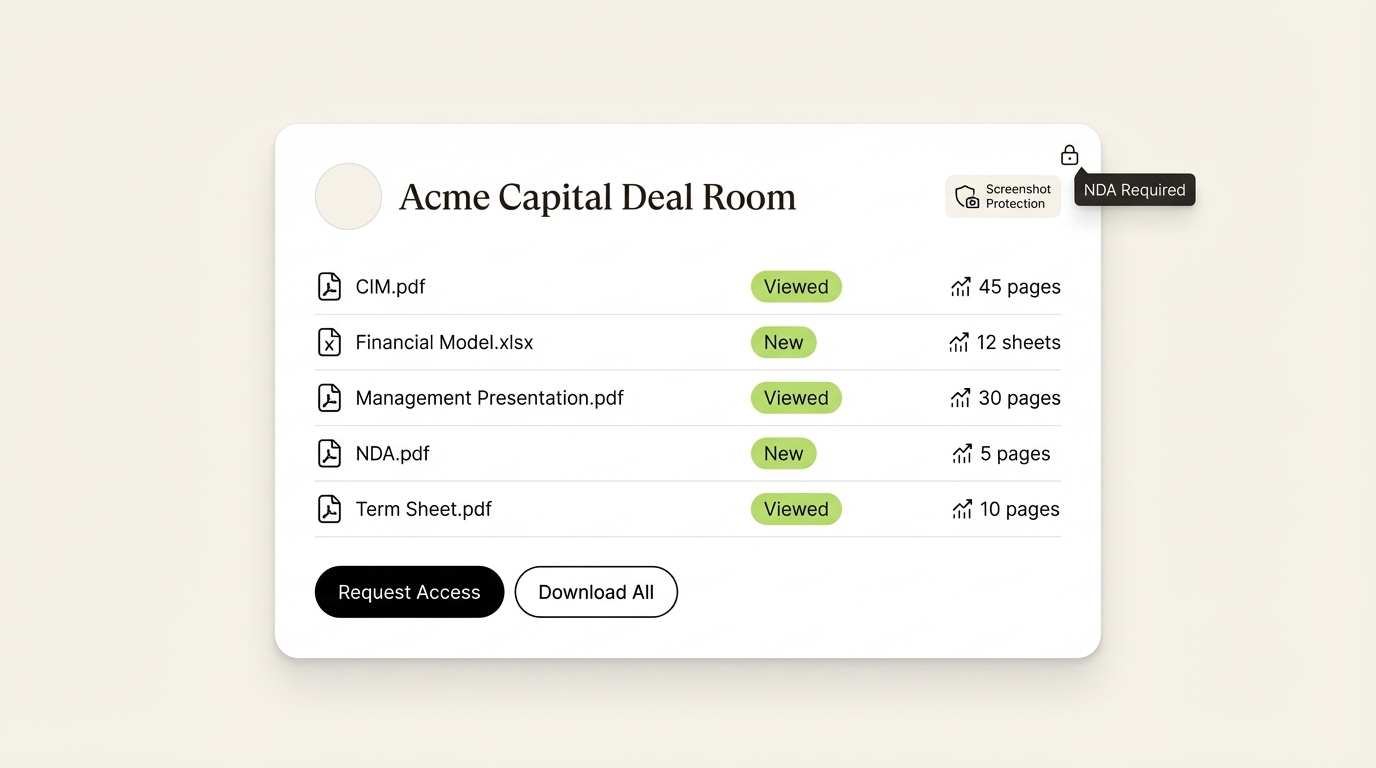
SendNow's branded deal rooms allow deal teams to present multiple documents under a single, NDA-gated link, with per-document analytics and screenshot protection across the entire room.
Q6a: What Our Own Data Says About How Decks Actually Get Read
Every other comparison on this topic ranks tools on feature checklists. We can add something none of them have: measurements from the documents themselves.
Across more than 10 million document views over roughly 18 months on SendNow, three findings shape which features are actually worth paying for:
| Measured on the SendNow platform | Value |
|---|---|
| Average viewing session | 2 min 30 sec |
| Average pitch deck length | ~8 pages |
| Change in repeat viewing | ~1.5x increase |
What that means for choosing a tool.
Two and a half minutes across an eight-page deck is roughly 19 seconds a page as a planning heuristic. It is a derived index, not a claim that every viewer spends exactly that on every page, but it settles a practical argument: nobody is reading your deck front to back on the first pass. A tool that only reports "opened / not opened" cannot tell you which two pages actually got that attention, which is the entire signal you need to time a follow-up. That is why page-level analytics, not open notifications, is the feature to filter on.
The repeat-viewing lift matters more than the raw session length. A second visit is the single most reliable precursor to a call request in this dataset. If a platform reports a session count but not returning-viewer identity, you lose the highest-intent signal it is capable of producing.
Full methodology, sample definitions and the caveats on every derived index are in the 2026 State of Document Engagement report, and the deck-specific cut is in the pitch deck engagement benchmarks.
Q6b: What Does the Same Feature Set Actually Cost?

Feature tables hide the thing that matters, which is what you pay to complete one real workflow. Here is the same job priced on both platforms:
| What you need | SendNow | DocSend | Difference |
|---|---|---|---|
| Basic analytics + link sharing | $17/mo | $65/user/mo | $48/mo |
| NDA gate + analytics | $17/mo | $150/mo | $133/mo |
| Dynamic watermark | $19/mo (Microsite Pro) | $150–$300/mo | up to $281/mo |
| Branded deal room | $19/mo | $150–$300/mo | up to $281/mo |
| Custom domain + advanced security | $43/mo | $300/mo | $257/mo |
| 3-user team with analytics | $43/mo flat | $195/mo (3 × $65) | $152/mo |
Across a twelve-month raise, a three-person team on DocSend Advanced versus SendNow Business is a difference of roughly $3,000 a year. At pre-seed that is a month of runway.
Q6c: Single Document Link, or a Deal Room?
Getting this wrong is the most common way teams overpay, in both directions.
A single document link is enough when:
- You are sending one pitch deck to individual investors
- You need per-viewer analytics and an NDA gate on one file
- You are in early outreach and want fast, clean sharing
You need a deal room (what SendNow calls a Microsite) when:
- You are sharing a full package: deck, financials, team, cap table, references
- You want one branded URL an entire partner firm can visit
- Different sections need different permissions
- You are running a formal Series A, M&A process, or LP raise
The naming is the only real difference between vendors here. A SendNow Microsite and a DocSend Data Room do the same job. One is $19/month and the other starts at $150.
Q6d: What Investors Actually Look At
Founders routinely over-engineer deck sharing. From the analytics side, five signals do nearly all the work:
- Did they open it? The single most valuable data point, and the one worth a real-time alert.
- Which pages held attention? Time on the financials means interest. Skipping the team slide is a flag.
- Did a second person open it? A forward to a partner is one of the most bullish signals in the dataset.
- Did they come back? Return visits almost always precede a call request.
- Are the financials gated? If the deck contains revenue or burn, an NDA gate is not optional.
Genuinely useful but secondary: custom branding, a clean link slug, an expiry date for after the round closes.
Overrated at early stage: in-document Q&A (investors email instead), full compliance audit logs (Series C concern, not seed), and multiple admin seats (one person runs a pre-seed raise).
Q6e: Which Tool, by Stage
| Your situation | Recommendation |
|---|---|
| Pre-seed, no budget, non-sensitive deck | Brieflink (free), with the NFX ownership caveat above |
| Pre-seed, want real analytics and an NDA gate | SendNow free trial, then Pro at $17/mo |
| Seed round, sharing deck plus financials | SendNow Pro ($17/mo) for NDA gate, full analytics, dynamic watermark |
| Series A, need a full investor room | SendNow Microsite Pro ($19/mo) for a branded portal and custom domain on Growth |
| Technical founder, wants self-hosted | Papermark self-hosted, budgeting ~€99/mo if you need room features |
| Large enterprise M&A or fund | Digify, budgeting $350–$1,500/mo |
Q6f: Migration Checklist
Moving off DocSend is a ten-minute job, not a project:
- Export your active content. Pull the current PDF and PPTX decks from your local drive or DocSend workspace.
- Upload. Drag the presentations and diligence files into your new dashboard.
- Set the controls. Turn on password protection, email gating, NDA acceptance, or dynamic watermarking as the document requires.
- Build the room, if you need one. Bundle multiple diligence files into a branded Microsite with per-folder permissions.
- Replace the old links. Swap DocSend URLs out of active investor sequences and CRM snippets. This is the step teams forget, and it is the one that costs you attribution.
Q7: Which DocSend Alternative Works Best for Small Teams?
Small teams: whether a two-person VC firm, a boutique investment bank, or a 3-person sales team: face a specific challenge: they need enterprise-quality security and analytics without enterprise pricing.
For small finance teams, SendNow's Pro plan at $17/month covers all core security features: NDA gating, watermarks, screenshot protection, page-level analytics, with no per-seat penalty for solo use. The Business plan at $43/month accommodates 3 team members with 1,000 documents and full deal room functionality. That is a total team cost lower than a single seat on DocSend's Standard plan.
For small sales teams that primarily need reliable engagement data and do not require finance-grade security, HummingDeck's Pro plan at $25/user/month offers the best combination of bot-filtered analytics and deal rooms at an accessible price point.
Check the full pricing breakdown to find the right plan for your team size.
Conclusion: The Right Alternative Depends on Your Use Case
DocSend built an important category. In 2026, that category has matured, and buyers have far more options at better price points than DocSend currently offers.
If you work in finance: venture capital, private equity, investment banking, or M&A: the priority is security depth and AI-powered engagement intelligence. SendNow ($17–$43/month) delivers every finance-grade feature that DocSend locks behind its $150/month Advanced tier, plus AI engagement scoring and an embedded AI chatbot that DocSend does not offer at any price.
If your primary concern is proposals and contracts, PandaDoc is worth evaluating. If you need enterprise VDR compliance, Digify is mature and proven. If you live in Google Drive, Orangedox removes migration friction. If reliable analytics for enterprise email targets is your top priority, HummingDeck's bot detection fills that gap.
Ready to leave DocSend's pricing behind? Start Free, No Card Required →
Pricing information accurate as of July 2026. Verify current rates on each provider's pricing page before purchasing.
FAQ: DocSend Alternatives in 2026
Is DocSend worth it for startups in 2026?
For most startups, no. DocSend's entry plan ($10/user/month) caps tracked visits at 100/month and offers no NDA gating, no deal rooms, and no dynamic watermarks. To get the security features a startup actually needs for investor fundraising: NDA gating, watermarks, data rooms: you are looking at DocSend's $150/month Advanced tier. Alternatives like SendNow Pro ($17/month) deliver identical finance-grade security at a fraction of that cost with a free trial included.
What is the best free DocSend alternative?
HummingDeck offers a functional free tier (5 documents, basic tracking) that is genuinely usable for early-stage founders testing investor outreach. Papermark also has a self-hosted free option for technical teams. SendNow does not have a permanent free tier but offers a no-credit-card free trial so you can test the full feature set before committing.
Does DocSend have bot traffic issues?
Yes, and it is a documented, persistent problem. Corporate email security systems: Microsoft Defender, Barracuda, Mimecast, Proofpoint: automatically open links in emails to scan for malware. DocSend cannot reliably distinguish these automated scans from real human views, which means your analytics may show a "view" before the actual recipient has touched the document. HummingDeck and SendNow both implement multi-layer bot filtering to exclude these false positives from your engagement data.
What is the difference between a Microsite and a data room?
The terms are used interchangeably in the market, but there is a practical distinction. A data room (traditional VDR term) typically implies a heavyweight, compliance-focused environment for M&A due diligence, often overbuilt for everyday deal-making. A microsite is a branded, lightweight deal room designed for ongoing investor relations, sales proposals, and fundraising, featuring the same NDA gating, watermarks, and analytics without the enterprise VDR overhead. SendNow's Microsite Pro ($19/month) is purpose-built for teams that want the security of a data room without the complexity or cost.
Can I track if an investor forwarded my deck?
Yes, with the right platform. SendNow's file tracking captures each unique viewer session, so if an investor forwards your link to a partner or colleague, you see a new session recorded against the same link with the new viewer's information (where available). You can also enable NDA gating, which requires each individual to consent before accessing the document, giving you a verified record of every person who viewed the deck.
Is Papermark actually free?
Papermark has a free self-hosted version for teams with the technical capability to run their own infrastructure. The managed cloud version (the one most teams actually use) starts at approximately $24/month and does not include NDA gating, dynamic watermarks, or screenshot protection on entry tiers. It is a legitimate open-source option for technical teams, but it is not meaningfully "free" for non-technical users who need a managed SaaS experience.
Can I use my own domain with a DocSend alternative?
Yes: SendNow, Papermark, and Orangedox all support custom domains on paid plans. With SendNow, you can serve your deal room links from your own domain (e.g., deals.yourfirm.com), reinforcing brand trust when sharing with investors or counterparties. DocSend supports custom domains only on its Advanced tier ($150/month). SendNow includes custom domains on its Business plan ($43/month).
What happens to my deck links when I cancel?
This varies significantly by platform. On most platforms: including DocSend: cancelling your subscription immediately deactivates all tracked links and disables analytics access. Recipients attempting to open previously shared links may see an error or a stripped-down view. With SendNow, links remain accessible through your billing period, and the platform provides an export of your analytics data before downgrade. Always verify the link deactivation policy before migrating from one platform to another, especially if you have active investor or client relationships relying on shared document links.
Keep Reading
The rest of the DocSend cluster
- DocSend vs SendNow: full feature and price comparison
- DocSend pricing explained, tier by tier
- DocSend data room alternatives for M&A and diligence
- DocSend alternatives for VC fundraising
Our research
- 2026 State of Document Engagement: 10M+ views analysed
- Pitch deck engagement benchmarks
Related buying guides
About the Author: Rifana Hameem
Rifana is the founder of SendNow. She leads the team in building secure, compliant, and analytics-rich document sharing tools for finance and professional teams worldwide.
Connect on LinkedIn